The price book works out the prices of a project’s units from a few rules: a base price per m², a step for each floor, and extra for the better orientations and views. You preview the result on the building, green where prices rise and red where they fall, and apply it only when it looks right. The same tab holds planned price rises and the project’s sales pace.
The Prices tab is for admins, on the web.
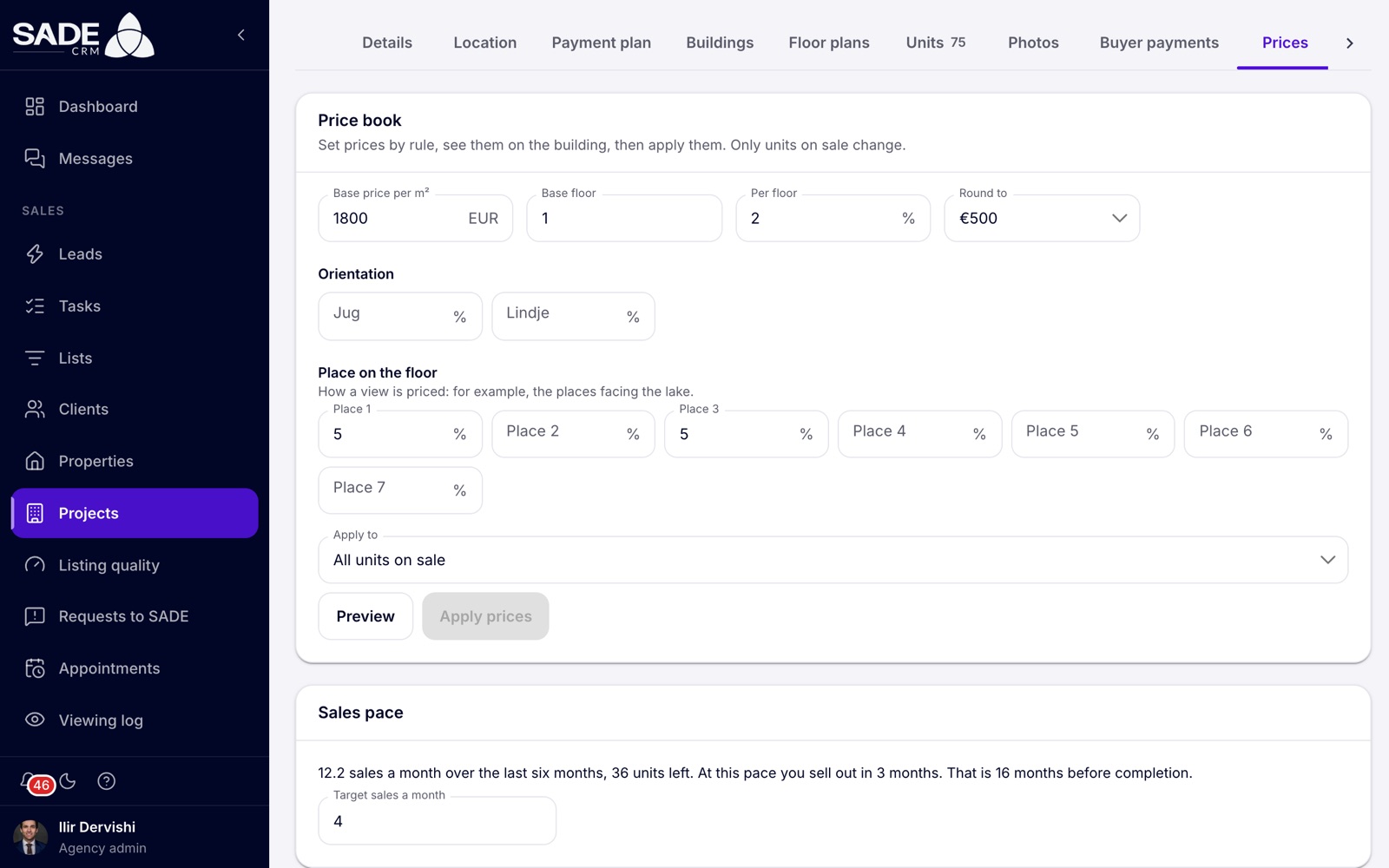
The price book of Rezidenca Liqeni, with the sales pace underneath.
How a price is worked out
For each unit, the price book takes the unit’s area times the base price per m², then adds or takes off a percentage:
Price = area × Base price per m² × (1 + (floors above the Base floor × Per floor % + the unit’s Orientation % + its Place on the floor %) ÷ 100), rounded to the nearest Round to.
Units on floors below the base floor get a negative floor step. A unit with no area gets no price from the rules.
Set the rules
| Field | What to enter |
|---|---|
| Base price per m² | The price per m² on the base floor, in the project’s currency. Required. |
| Base floor | The floor the base price is for. 1 by default. |
| Per floor | The percentage added for each floor above the base floor, from -50% to 50%. |
| Round to | 1, 10, 100 (the default), 500 or 1,000. |
| Orientation | One percentage for each orientation your units have, such as “South”. From -50% to 50%. Leave one empty for no change. |
| Place on the floor | One percentage for each place on the floor, such as “Place 1”, to price a view: for example, the places facing the lake. From -50% to 50%. |
| Apply to | All units on sale, one building, or one floor plan. |
The orientations listed are the ones written on your units, and the places are those worked out from the unit codes.
Preview and apply
- Set the rules and click Preview.
- Read the summary, for example “28 units change: €4,712,000 → €4,958,500”, and look at the building drawn below it. Greener units rise, redder units fall. Units not on sale keep their price.
- Click Apply prices. The CRM asks “Apply these prices?”, and tells you each change goes into the unit’s history.
- Confirm. You see “Prices changed on 28 units” (with your own number).
- Click Save at the bottom to keep the rules for next time. You see “Price book saved”. Saving changes no price.
Important: only Available units change. A unit on hold keeps the price its client was told, and reserved and sold units keep theirs.
Every price change goes into the unit’s history, and shows on the marketplace within a few minutes.
Planned rises
A planned rise is a price increase you decide in advance, to apply once a share of the units has sold. It is only a reminder: it never applies by itself.
- Under Planned rises, click Add a rise.
- Fill in the Rise (5% by default, up to 50%) and After sold (30% by default): the share of units sold that makes it due.
- Click Save.
“Sold” here counts reserved and sold units out of all the project’s units. Units on hold don’t count.
When the share is reached, a banner says so, for example “60% of the units have sold, so the 5% rise is due.” Click Apply the rise and confirm “Raise prices by 5%?”. Every available unit goes up by that percentage and is rounded to Round to; reserved and sold units keep their price. The rise then shows “Applied” with the date, and can’t be applied twice.
Sales pace
The Sales pace card shows how fast the project is selling and when it would sell out at that speed:
- “12.2 sales a month over the last six months, 36 units left.”
- “At this pace you sell out in 3 months.”
- “That is 16 months before completion.”, “That is 4 months after completion.” or “That is the month of completion.”
Sales are counted on the date they were reserved, over the last six months, leaving out cancelled ones. The units left are the available units plus those on hold. With no sales in that time, the card reads “No sales in the last six months.”
Target sales a month is a number you record for the project, from 0 to 10,000. It is saved with the price book.
An example
Ilir sets the price book for Rezidenca Liqeni: Base price per m² 1,800 EUR, Base floor 1, Per floor 2%, Round to 500. South-facing flats (“Jug”) get 3%, and places 1 and 3, which face the lake, get 5% each. Apply to stays on All units on sale.
For A-703, a 2+1 of 98 m² on floor 7, facing south, in place 3:
- 98 m² × €1,800 = €176,400;
- six floors above the base at 2% = 12%, plus 3% for the south, plus 5% for the lake view = 20%;
- €176,400 × 1.20 = €211,680, rounded to the nearest 500 = €211,500.
He clicks Preview, checks the green and red on the building, then Apply prices, and Save.
He also plans a 5% rise after 60% sold. The project has 75 units, so the rise is due when reserved and sold units reach 45. Today 40 are reserved or sold, so there is no banner yet.
Something unclear or missing? Write to [email protected] or call +355 69 808 0118.