A project is a new development sold off plan or under construction: its buildings, floor plans and units, each with a price and a status, and a payment plan. Buyers see it on the SADE marketplace as one project, with every unit and what is still available, instead of one listing per apartment.
Developers use projects to sell their own buildings. Agencies use them to sell a developer’s building on the developer’s behalf. Both work the same way, and both can invite other agencies to sell with them.
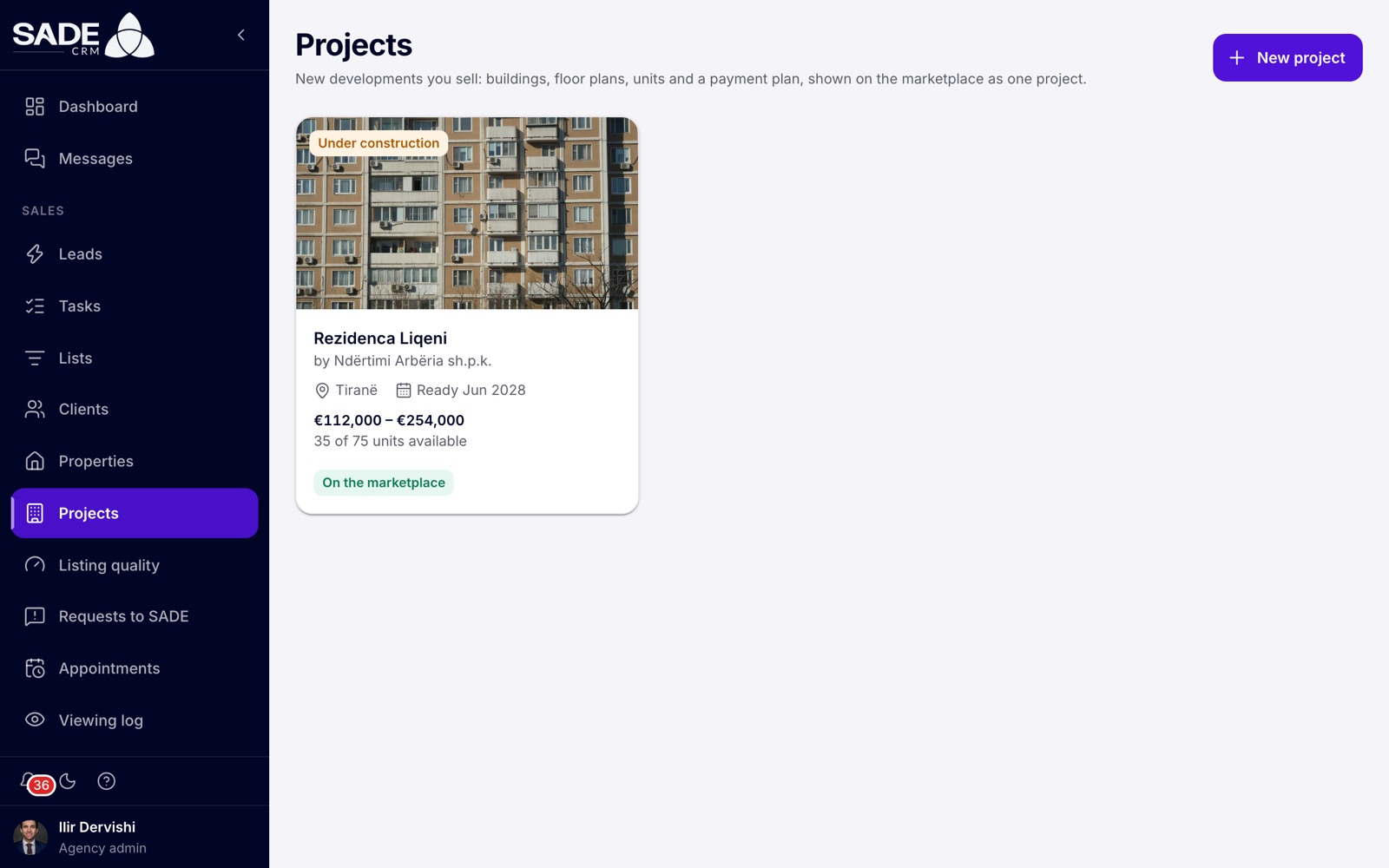
The Projects page. Each card shows the project’s status, completion date, price range, how many units are left and whether it is on the marketplace.
Who gets projects
Projects come with a plan that includes them. The plans are listed on sadecrm.com/pricing.
| Your agency | Projects |
|---|---|
| On the Pro plan, or on a Pro trial | Yes |
| Part of an Enterprise organization | Yes, always |
| On any other plan | No. The project pages show a card that explains where to get them. |
Any agency on such a plan can create projects. It does not have to be a developer.
Without projects on your plan
On a plan without projects, Projects and Partner projects are not in the menu. If you open a project page from a link, you see a card instead:
- The title reads “Projects come with Pro”.
- It explains: “New developments, their units and the partner network aren’t part of your plan. Nothing you added is lost: it comes back with the plan.”
- An admin also gets a See plans button, which opens the agency’s plan and billing page. An agent reads “Ask your agency’s admin about moving to a plan with projects.”
If a plan with projects ends, the agency’s projects leave the marketplace. Nothing is deleted: the projects, units, sales and payments are all there again when the agency moves back to a plan with projects. See Plans and billing.
Note: projects and their units do not count towards your plan’s listing limit.
Developers and agencies
When you sign up, the You are field asks whether you are a Real estate agency or a Developer. A developer starts on a free trial of Pro, the plan with projects, and can only choose plans that include projects.
A developer has the same CRM, the same roles and the same pages as an agency. Only two things change.
The menu order
A developer’s day starts from its projects, so Projects moves to the top of the menu, right under Dashboard. The sales part of the menu then follows the order of the sales work: Leads, Tasks, Lists, Clients, Appointments, Viewing log, Deals, Partner projects, Properties, Listing quality and Requests to SADE. Nothing is removed.
For an agency on Pro, Projects sits in the sales part of the menu, after Properties.
The developer dashboard
At the top of a developer’s Dashboard are four tiles with totals across all its projects: Available, Reserved, Sold and Enquiries. Reserved includes units on hold. Below them, a Projects table lists the five projects changed most recently, with the same figures for each, and an All projects button. The usual dashboard follows underneath.
With no projects yet, the section shows “No projects yet” with a New project button for admins. Agents read “Your agency’s admins add projects.”
Who does what
| Admin | Agent | |
|---|---|---|
| See the projects and open every project | Yes | Yes |
| Create, edit, publish and delete projects | Yes | No: every field is read-only |
| Add, edit and delete units | Yes | No |
| Hold and reserve available units | Yes | Yes |
| Move a sale on or cancel it | Any sale | Their own sales, and they can cancel only a reservation |
| See the Prices, Partners and Widget tabs | Yes | No |
| See Buyer payments | Every sale | Their own sales only, read-only |
Agencies invited to sell your project, your partners, see a reduced version of the building and work only on their own clients. See Selling as a partner.
From an empty project to sold units
This chapter follows the order you will work in:
- Create the project: its details, location, payment plan, buildings and photos, then publish it on the marketplace.
- Add the floor plans and trace the building: the layouts on offer, the traced floors and the facade.
- Add the units and sell them: one by one or many at once, then holds, the waiting list, reservations, contracts and viewings.
- Work from the building board: every unit on one drawing, coloured by status or by price, enquiries or days unsold.
- Set prices by rule and watch the sales pace.
- Put the building on your own website, with enquiries arriving as leads.
- Invite partner agencies to sell with you, on terms you set. If you are the invited agency, read Selling as a partner.
- Record buyer payments from the contract to the keys.
- Open a lender room for your bank: a read-only link with the totals.
Tip: the phone app shows your projects and the building, and you can hold, reserve and book viewings from it. Projects are created and edited in the CRM on the web. See The mobile app.
An example
Tirana Living Real Estate sells Rezidenca Liqeni, a development by Ndërtimi Arbëria sh.p.k. on the Artificial Lake in Tirana: 75 units in two buildings, Pallati A and Pallati B, ready in June 2028. Tirana Living is on Pro, so Projects is in its menu after Properties.
Ilir Dervishi, the admin, creates the project with Ndërtimi Arbëria sh.p.k. in the Developer field and a payment plan of 30% on signing, 50% at the frame and 20% at handover. He adds the two buildings, three floor plans (1+1, 2+1 and 3+1) and the 75 units, traces the typical floor and publishes the project. Because Tirana Living is verified, it is on the marketplace within minutes.
Arta Krasniqi, Besnik Leka and Erjona Hasani hold and reserve units for their clients from the building board. Ilir invites Adriatik Homes to sell too, at 3% commission. When contracts are signed he records the buyers’ payments, and he sends the developer’s bank a lender link so it can follow sales and collections without a CRM account.
Something unclear or missing? Write to [email protected] or call +355 69 808 0118.