Lead routing decides who gets each new lead, and how fast they need to answer it. You write rules such as “marketplace leads for sales in Tiranë go to Arta and Besnik in turn”, put them in order, and choose where a lead goes when no rule fits. On the same page you set your agency’s response target, the reminders agents get, and when you, the admin, are told about a lead nobody has answered.
Only agency admins can open this page. Go to Settings → Lead routing (under the Leads heading in the settings menu).
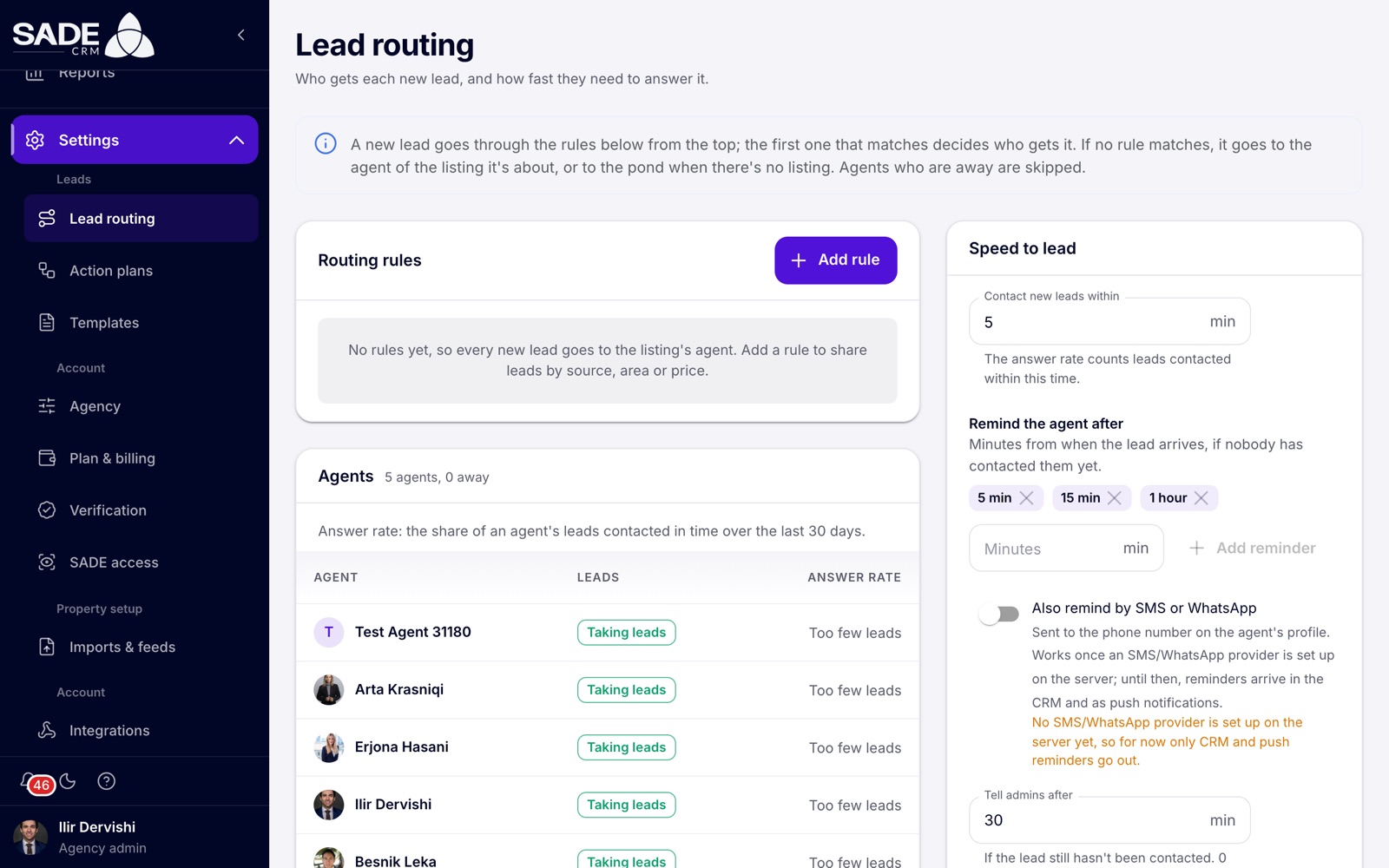
Lead routing at Tirana Living before any rules were added: every lead goes to the listing’s agent.
The page has three parts: Routing rules, the Agents card, and the Speed to lead card on the right. A box at the top explains in one sentence how routing works with your current settings.
How a lead finds its agent
When a new lead arrives:
- If the person already has an agent, or is already in the pond, they stay where they are. Routing is only for people nobody works yet.
- If the person made one of your agents their own agent on the SADE marketplace, the lead goes straight to that agent, as long as the agent is still active in your agency.
- Otherwise the rules are tried from the top. The first rule that matches the lead, and can place it, decides who gets it.
- If no rule places it, the lead goes to the fallback you chose: the listing’s agent, or the pond.
Agents who have turned off Taking new leads are skipped at every step. See Taking new leads.
Adding a rule
- Click Add rule. The Add a routing rule dialog opens.
- Give the rule a Name, for example “Marketplace sales in Tirana”. Leave On switched on.
- Under Which leads, fill in the conditions the lead must meet. Leave a field empty to match anything.
- Under Give it to, choose how the lead is handed out and to whom.
- Click Add rule. The CRM says “Rule added”.
Which leads
| Field | What to enter |
|---|---|
| Sources | Where the lead comes from. Pick a suggestion (SADE Marketplace, Website, MerrJep, Indomio, idealista, Rightmove) or type any source and press Enter. It must match the source exactly as the CRM shows it, though upper and lower case don’t matter. |
| What they asked for | The kind of enquiry: Signed up, Inquiry, Wants to sell, Asked about a listing, General question, Phoned, Came to an open house. |
| Cities | The area the rule covers, as a list of cities. Type at least three letters to find each one. |
| Property types | The types of property, grouped by category. |
| Sale or rent | Sale or rent (either), For sale or For rent. |
| Price from (EUR) and Price up to (EUR) | A price range, compared with the listing’s price in euros. “From” can’t be higher than “up to”. |
A rule matches only when every field you filled in matches.
Important: Cities, Property types, Sale or rent and the price all come from the listing the lead is about. A lead with no listing never matches a rule that uses them. That includes general questions, lead emails from other portals, and enquiries about a project.
The ways leads are handed out
| Give it to | What happens | What you choose |
|---|---|---|
| Round robin | Each agent in turn. | Agents (one or more), and optionally Skip agents with an answer rate under a percentage. |
| First to claim | The lead is offered to all the agents at once. The first to claim it gets it. If nobody claims it in time, it goes to the pond. | Agents, and Time to claim it in minutes (1 to 1,440; 10 by default). |
| One agent | Always the same person. | Agent (exactly one). |
| The pond | The lead goes to the pond, where any agent can claim it. | Nothing more. |
You can pick any active agent or agency admin of your agency. The picker shows each person’s answer rate, and an Away chip for anyone who isn’t taking new leads.
How each one behaves:
- Round robin follows the order of the agents in the rule. An agent who is away is skipped but keeps their turn for when they are back. If you change the rule’s list of agents, the turn starts again from the first agent.
- Skip agents with an answer rate under passes over agents whose answer rate is below the figure. Agents with fewer than 5 leads in the last 30 days are never skipped, and if every agent is under the figure, nobody is skipped.
- First to claim shows the lead under Offered to you on each agent’s Leads page, with a countdown.
- If every agent in a rule is away, the rule can’t place the lead and the next matching rule is tried.
The order of rules
Rules are tried from the top down, and the first one that matches and can place the lead wins. Put narrow rules above broad ones: a rule for “marketplace sales over €200,000” must sit above a rule for “all marketplace leads”, or it will never be reached.
Each rule in the list is written out as a sentence, for example “Leads from SADE Marketplace for sale in Tiranë between €80K and €250K → round robin between Arta Krasniqi and Besnik Leka”. The card’s heading shows how many rules you have and how many are on.
To change a rule:
- Reorder: drag it by its handle, or use Move up and Move down.
- Pause: use its switch. A switched-off rule shows an Off chip and is skipped.
- Edit: click the pencil (Edit), change the rule and click Save. The CRM says “Rule saved”.
- Delete: click the bin (Delete) and confirm with Delete rule. New leads stop going through it; leads it already gave out keep their agent.
When no rule matches
The last line of the rules card says where a lead goes when no rule places it. You choose this in the Speed to lead card, under When no rule matches, give the lead to:
- The listing’s agent (the pond when there’s no listing). This is the default. A lead about a listing goes to the agent the listing is assigned to. A lead with no listing, or whose listing agent is away, goes to the pond.
- The pond, where any agent can claim it.
With no rules at all, every lead goes to this fallback.
The agents card
The Agents card lists everyone who can receive leads, with:
| Column | What it shows |
|---|---|
| Agent | The person’s name. |
| Leads | Taking leads, or Away if they have turned off Taking new leads. |
| Answer rate | The share of the agent’s leads contacted within your response target over the last 30 days. It shows Too few leads until the agent has had 5 leads in 30 days. |
The answer rate counts the leads that are that agent’s now. Leads nobody contacted count as not in time. For a lead the agent claimed, the time counts from the claim.
The card is for reading only. Each agent turns Taking new leads on and off themselves on their Leads page.
Speed to lead settings
The Speed to lead card holds one set of settings for the whole agency. They apply to every lead, whichever rule placed it.
| Setting | What it does | Allowed | Default |
|---|---|---|---|
| Contact new leads within | Your response target, in minutes. The answer rate counts leads contacted within this time, and the timers on the Leads page turn amber after it. | 1 to 1,440 | 5 |
| Remind the agent after | Reminders, in minutes from when the lead arrives, if nobody has contacted the person yet. Type a number in Minutes and click Add reminder; remove one with its cross. | Up to 6, each 1 to 10,080 | 5, 15 and 60 |
| Also remind by SMS or WhatsApp | Also sends reminders to the phone number on the agent’s profile. | On or off | Off |
| Tell admins after | Minutes after which every agency admin is told the lead still hasn’t been contacted. 0 turns this off. | 0 to 10,080 | 30 |
| Move the lead to the pond when admins are told | At that moment, takes the lead from its agent and puts it in the pond. | On or off | Off |
| When no rule matches, give the lead to | The fallback described above. | Listing’s agent or the pond | The listing’s agent |
| Receive seller leads from the marketplace | Offers your agency to owners who check what their home is worth on the SADE marketplace. Each one who chooses you arrives as a new lead, routed by your rules. | On or off | On |
Click Save to keep your changes, or Discard to undo them. The CRM says “Speed-to-lead settings saved”.
Note: SMS and WhatsApp reminders need a messaging provider set up on SADE’s side. Until then the card says so, and reminders arrive in the CRM and as push notifications on the phone app only.
What the agents and admins receive
| When | Who | Notification |
|---|---|---|
| A lead is given to an agent | That agent | “New lead: Marco Rossi”, with the target, e.g. “Contact them within 5 minutes.” |
| A lead is offered with First to claim | Each agent it is offered to | “Claim this lead: …” |
| A lead lands in the pond | Every agent taking new leads, and the agency admins | “New lead in the pond: …” |
| A reminder minute passes and nobody has made contact | The lead’s agent, or the agents it is offered to | “Jonida Leka has waited 5 min” |
| The Tell admins after minute passes | Every agency admin | “No one has contacted …”, with how long and which agent |
Reminders and the admins’ alert count from when the lead arrived, even if an agent claimed it later. Once a lead has been escalated to the admins its timer turns red. All of these go to the bell and the Notifications page, and as push notifications to the phone app. Clicking one opens the client.
Example
Ilir Dervishi, the admin of Tirana Living Real Estate, sets up routing for the first time.
Rule 1, “Marketplace sales in Tiranë”. Sources: SADE Marketplace. Cities: Tiranë. For sale. Price from (EUR) 80000, up to 250000. Give it to Round robin, agents Arta Krasniqi and Besnik Leka.
Rule 2, “Portal emails”. Sources: MerrJep and Indomio. Give it to First to claim, agents Arta, Besnik and Erjona Hasani, Time to claim it 10 minutes. This rule uses no city or price, because portal emails are never linked to a listing.
The fallback stays on The listing’s agent. In Speed to lead he keeps the target of 5 minutes, reminders at 5, 15 and 60 minutes, and Tell admins after 30.
On Monday morning:
- A buyer asks on the marketplace about a 2+1 for sale in Blloku, Tiranë, at €145,000. Rule 1 matches and the lead goes to Arta. The next one goes to Besnik.
- A buyer asks about a flat for rent in Tiranë. Rule 1 doesn’t match (it is for sale only) and rule 2 doesn’t either, so the lead goes to the listing’s agent, Erjona.
- A MerrJep email arrives at 10:00. Arta, Besnik and Erjona each get “Claim this lead”. Besnik claims it at 10:04 and calls at 10:06. For his answer rate, the 2 minutes count from the claim.
- Besnik is away on Tuesday and turns off Taking new leads. The round robin in rule 1 gives every marketplace sale lead to Arta until he is back, then picks up with his turn.
Something unclear or missing? Write to [email protected] or call +355 69 808 0118.