A project sells faster when more agents can offer it. The partner network lets you invite other agencies to sell your project, each on its own terms: a commission, a period during which their clients are protected, and either every unit or only some. Partners see the building and work their own clients, without seeing yours.
SADE records what was agreed and what each partner is owed. It takes no share of the commission and moves no money: you pay your partners as you always have.
The Partners tab is for the project’s admins, on the web. The agency you invite works from its own Partner projects page: see Selling as a partner.
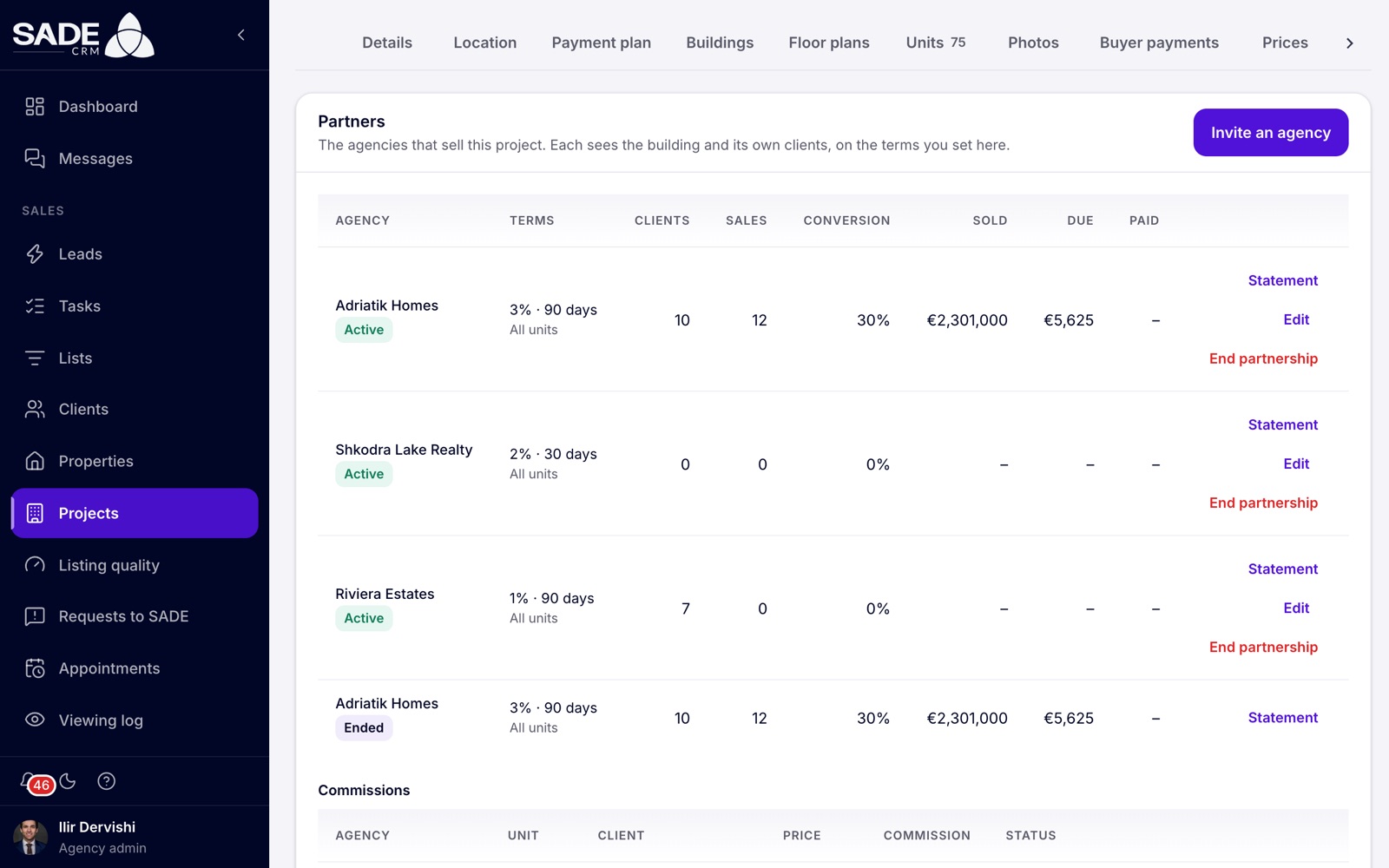
The Partners tab. Each row is one agency, with its terms and what it has sold.
Before you invite
- Your agency needs projects on its plan, and so does the agency you invite. Projects come with Pro, or with an Enterprise organization. See Projects for developers.
- The invited agency’s admin accepts the invitation. If the agency isn’t on SADE yet, it can sign up from the link in the email, and it starts on a free trial of Pro, so it can accept straight away.
Invite an agency
-
Open the project and click the Partners tab.
-
Click Invite an agency.
-
Fill in the terms:
Field What to enter Agency’s email The address the invitation goes to, usually the agency’s admin. Commission The partner’s share of each sale’s price, from 0% to 100%. Client protection (days) How long a client the partner registers stays theirs: 1 to 730 days, 90 by default. All units On by default: the partner can sell every unit. Turn it off and choose the Units they can sell. -
Click Invite an agency. You see “Invitation sent”.
The agency gets an email with the subject “Tirana Living Real Estate invites you to sell Rezidenca Liqeni” (with your names) and a link that works for 30 days. The row shows the email address and Invited until they accept. When they do, you get a notification, “Adriatik Homes accepted your invitation to sell Rezidenca Liqeni”, and the row turns Active.
The partners table
| Column | What it shows |
|---|---|
| Agency | The partner, with its status: Invited, Active or Ended. |
| Terms | The commission and the protection days, such as “3% · 90 days”, and All units or the number of units. |
| Clients | The clients the partner has registered on this project. |
| Sales | The partner’s sales of this project. |
| Conversion | The share of the partner’s registered clients who went on to reserve. |
| Sold | The value of the partner’s sales. |
| Due | Commission recorded and not yet paid. |
| Paid | Commission you have marked paid. |
Money columns are shown per currency. Each row has Statement, Edit and End partnership.
Change the terms
- Click Edit on the partner’s row. The dialog is Change the terms.
- Change the commission, the protection days or the units, and click Save. You see “Terms saved”.
The partner’s admins get a notification that their terms have changed. A sale already reserved keeps the commission that was in force on the day it was reserved.
What partners see
| A partner sees | A partner never sees |
|---|---|
| The building board, read-only, with only the units you let it sell | Your clients, your leads and your agents’ names |
| Other agencies’ units as the public sees them: a held unit reads Reserved, with no client or agent | Other partners, their clients or their terms |
| Its own clients, holds, reservations and terms | The waiting lists and enquiry counts |
| Its own commissions and statement | Your buyer payments, even for the sales it brought |
Partners can hold available units, reserve them at the listed price, and cancel their own reservations. The contract, the completion and every later step are yours.
Whose sale it is
The first agency to register a client keeps them, for the protection days you set.
- A partner registers a client on your project, or holds a unit for them, which registers them too.
- Clients are matched on phone number or email, across all partners of the project. If another partner has already registered the person, or your agency already has them on this project (an enquiry, a sale, a hold, a waiting-list place or a viewing), the registration is refused.
- While the protection lasts, the client is the partner’s on this project.
Before a reservation, you see a partner’s registered clients only as a count. When the partner reserves a unit, the buyer’s name, phone and email are copied to your clients, with the source “Partner:” and the partner’s name, or matched to a client you already have. Your admins get a notification such as “Adriatik Homes reserved Rezidenca Liqeni · B-301”. On the board, a partner’s hold shows under the partner’s name, and a partner’s sale reads “Sold by” the partner.
If one of your own agents reserves a unit for a client a partner has registered, the Reserve dialog warns: “A partner has registered this client until” a date. “The sale will count as theirs.” It doesn’t say which partner. If you go ahead, the sale counts as the partner’s, and the partner who registered the client first gets it.
Note: matching compares the phone numbers and emails the agencies typed. Nobody confirms them, so a typing mistake makes a different person. Ask your partners to type phone numbers in full, with the country code for foreign buyers.
Commissions
A commission is recorded once, when a partner’s sale reaches Contract signed (or goes straight to Sale completed). It is the agreed sale price times the commission in force on the day the sale was reserved, rounded to the cent. Until then, the table reads “No commissions yet. One is recorded when a sale reaches contract.”
The Commissions table lists each one with its Agency, Unit, Client, Price, Commission and Status:
| Status | Meaning |
|---|---|
| Due | Recorded and not yet paid. |
| Paid | You have marked it paid. |
| Cancelled | You disputed it, or the sale was cancelled before it was paid. |
Mark a commission paid
When you have paid the partner, click Mark paid on the row. You see “Marked as paid”. The partner sees it as Paid on its Commission tab.
Dispute a commission
If you don’t agree that a commission is owed, click Dispute on a Due row.
- The dialog reads “Dispute the commission on” the unit, and explains that the partner is told and your reason stays on the record and the statement.
- Write the Reason. It is required.
- Confirm. The commission becomes Cancelled, with your reason, and the partner’s admins get a notification.
When a sale is cancelled
Cancelling a partner’s sale cancels its commission if it is still due. A commission already marked paid stays paid: settling it is between you and the partner.
Statements
Click Statement on a partner’s row to download a PDF of that partner’s commissions on the project. The partner can download the same statement from its side. Each agency gets it in Albanian when its CRM language is Albanian, and in English otherwise.
End a partnership
- Click End partnership on the row.
- Read the warning: the partner loses access to the project at once and its holds are released. Sales and commissions stay on record.
- Confirm. You see “Partnership ended” and the row shows Ended.
The partner keeps its Commission tab for the project, so it can still see what it is owed and download its statement.
Tip: tell the agency before you end the partnership, so its agents aren’t surprised in front of a client.
Limits
- You can send up to 20 invitations a day, or 3 a day while your agency is not yet verified.
- An email can have only one open invitation per project: “This email already has an invitation.”
- A partner can register up to 50 clients a day and keep up to 10 units on hold at once.
An example
Ilir Dervishi wants more agents on Rezidenca Liqeni. He opens Partners → Invite an agency, types the email of Gentian Hoxha, Adriatik Homes’ admin, sets Commission to 3 and keeps Client protection (days) at 90 and All units on.
Gentian accepts the next day, and Ilir sees “Adriatik Homes accepted your invitation to sell Rezidenca Liqeni”. A week later an Adriatik agent reserves B-301, a 3+1 of 135 m² at €233,000, for a client she registered. Ilir is told, and the buyer appears in Tirana Living’s clients with the source “Partner: Adriatik Homes”.
When the contract is signed, Ilir clicks Contract signed on B-301. A commission of €6,990.00 (3% of €233,000) appears as Due on both sides. At the end of the month Tirana Living pays Adriatik Homes by bank transfer, and Ilir clicks Mark paid. Both agencies download the Statement for their records.
Something unclear or missing? Write to [email protected] or call +355 69 808 0118.