SADE CRM is the system a real estate agency runs on. Every enquiry becomes a lead with a clock on it, every listing goes to the SADE marketplace once it is ready, and every viewing, deal and follow-up sits with the person it belongs to. Developers use the same CRM to sell new buildings unit by unit, with partner agencies, buyer payments and a read-only room for their bank.
This guide explains how all of it works, screen by screen, with examples taken from a demo agency. It describes what the CRM does today and nothing more.
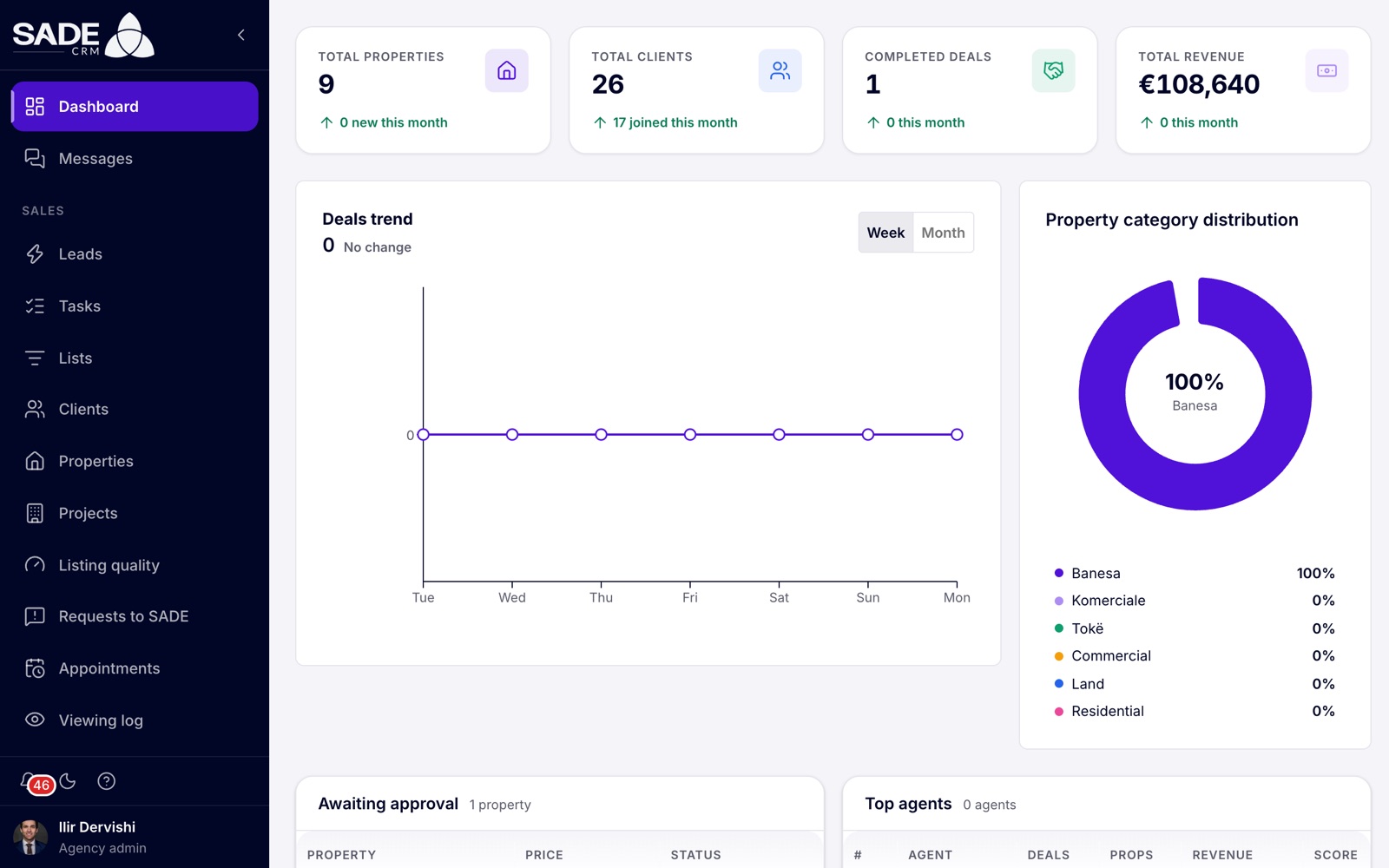
The dashboard is the first page you see after signing in.
Who uses SADE CRM
Everyone signs in at crm.sadegre.com. What you see depends on your role.
| Role | Who it is | What they can do |
|---|---|---|
| Agency admin | The person who signed the agency up, usually the owner or office manager. | Everything in the agency: the team, settings, lead routing, templates, reports, billing and verification. |
| Agent | Everyone else in the agency. | Their own leads and clients, the shared pond, listings assigned to them, viewings, deals and tasks. |
| Organization admin | Only on the Enterprise tier: someone who runs several agencies, such as a franchise head office. | The organization’s agencies, people and reports, and the agencies’ CRMs when the organization’s access policy allows it. |
A developer is a company that signed up as a developer instead of an agency. It has the same roles and the same CRM, with Projects moved to the top of the menu.
Note: SADE’s own staff check your registration documents and review listings before they go public. They can also open your CRM read-only, for example to help with a problem, and every time they do it shows on your SADE access page.
How the CRM is laid out
The menu on the left has three parts:
- Sales: the daily work. Leads, Tasks, Lists, Clients, Properties, Projects, Listing quality, Requests to SADE, Appointments, the Viewing log and Deals.
- Team: Agents, Promotions, Market prices and Reports. Agents see only some of these.
- Settings: shown to agency admins only. Lead routing, Action plans and Templates; the agency’s profile, plan, verification, SADE access and Integrations; and Imports & feeds.
At the bottom of the menu are the bell (your notifications), the light and dark switch, the help button that replays the guided tour, and your name, which opens your profile and the sign-out button.
A day in SADE CRM
A buyer asks about a flat on the SADE marketplace at 10:02. The lead arrives in the CRM at once and the routing rules give it to Arta, who sells in that area. Arta gets a notification and the lead appears under Waiting for you with a timer.
Arta calls at 10:05 and logs the call, which stops the timer. The agency’s action plan has already queued a WhatsApp message for two hours later, written from a template. The buyer books a viewing for Thursday, which goes on the calendar, and after the viewing Arta opens a deal. When the deal is completed the listing is marked sold and comes off the marketplace.
Finding your way around this guide
The guide follows the order you will meet things in:
- Getting started: signing up, your first hour, signing in and verification.
- Your agency: settings, the team, notifications, plans and billing.
- Leads and clients: how leads arrive, who gets them and how to follow up.
- Listings: adding, publishing and keeping listings in good shape.
- Viewings and deals: the calendar, the viewing log, deals and reports.
- Projects for developers: selling a new building with the CRM.
- The mobile app, Integrations, Enterprise and Security and help.
Use the search box in the sidebar to jump to any topic (press / to focus it). To read the guide offline or print it, download it as a PDF with the button in the sidebar.
Tip: the CRM speaks 11 languages. This guide is in English, and it quotes button and menu names as they appear in the English CRM. You can switch your CRM to English at any time from your profile to follow along.
Something unclear or missing? Write to [email protected] or call +355 69 808 0118.