Before anything of yours appears on the SADE marketplace, SADE checks that your agency is a registered business. You send your business number and a few documents from the Verification page, and SADE checks them against the public register.
Your CRM works fully while you wait: you can add listings, take leads and book viewings from the first day. Until SADE has verified the agency, though, none of its listings, projects or its agency page are on the marketplace, and it can’t buy promotions.
Only the agency admin sends the documents. Agents see the status in a banner, but not the documents.
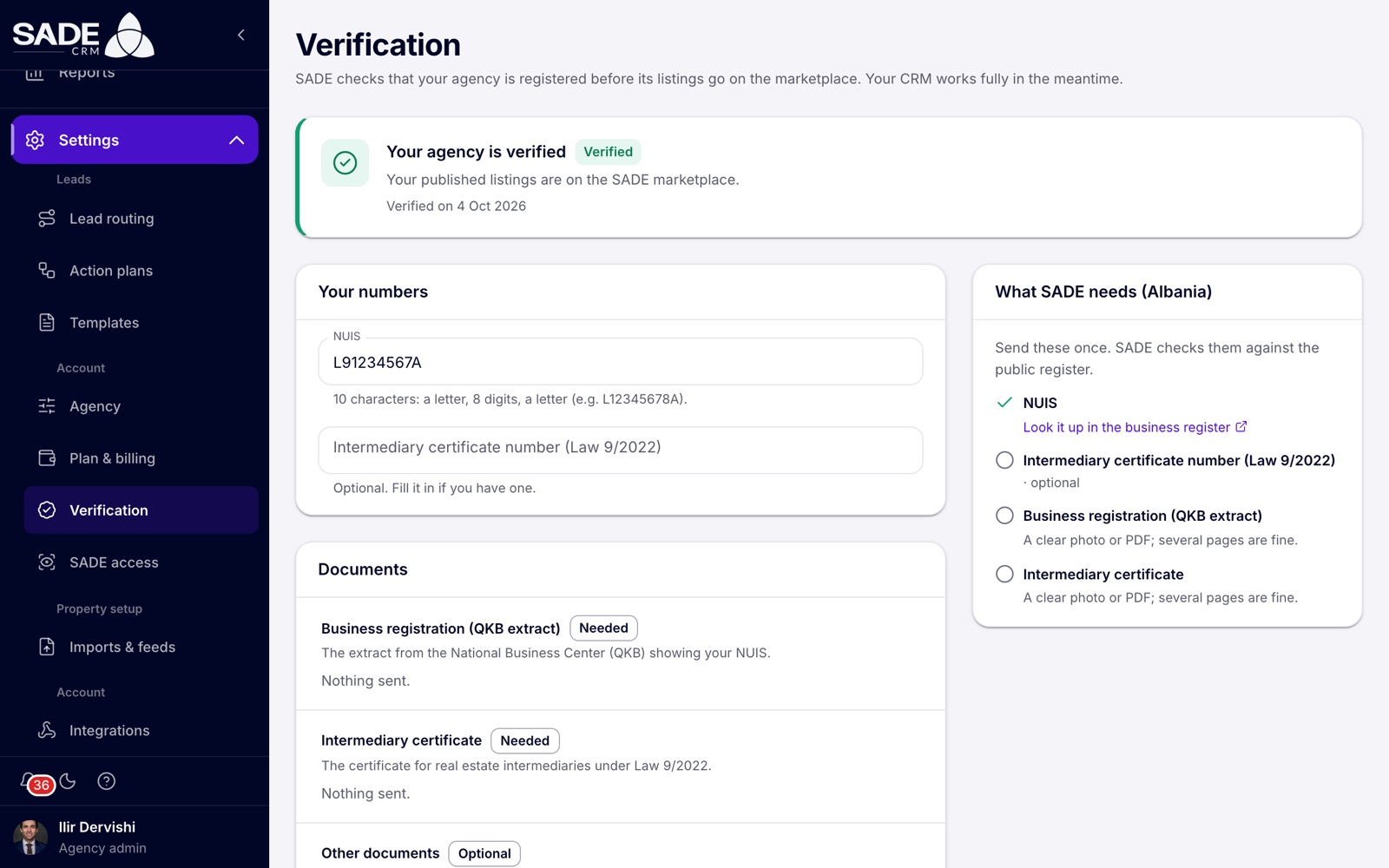
A verified agency. The right-hand card lists what SADE needs in your country.
Send your documents
- Open Settings, then Verification (under Account). You can also click Send documents in the banner at the top of the page.
- Read the card What SADE needs on the right. It names your country and lists the numbers and documents you need. Where your country has an online business register, the link Look it up in the business register opens it.
- Under Your numbers, enter your business number. Its name depends on your country, for example NUIS in Albania. If your country also has a licence number for agents, you can enter it too. Each number shows “Saved” once it is stored.
- Under Documents, drop your files on the box, or click it to choose them. Each kind of document shows Needed, Optional or Added.
- When everything is in, click Send for checking.
The status changes to Being checked. You can’t change your numbers or documents while SADE is checking them.
Tip: a clear photo taken with your phone is fine, and several pages of one document can be separate files.
Statuses
| Status | What it means |
|---|---|
| Not verified | You haven’t sent anything yet. Your listings aren’t on the marketplace. |
| Being checked | SADE is checking your documents. SADE emails you when it’s done. |
| Verified | “Your published listings are on the SADE marketplace.” The page shows the date. |
| Not accepted | SADE couldn’t verify the agency. The page shows SADE’s note saying why. Fix what it says and send again. |
What SADE needs in your country
Every country needs a business registration extract and your business number. Albania also needs the intermediary certificate.
| Country | Business number | Documents needed |
|---|---|---|
| Albania | NUIS: 10 characters, a letter, 8 digits and a letter (e.g. L12345678A) | Business registration (QKB extract) and the intermediary certificate (Law 9/2022) |
| Italy | Partita IVA | Chamber of Commerce extract (visura camerale) |
| Kosovo | NUI (ARBK) | Business registration extract |
| Montenegro | PIB | Business registration extract |
| North Macedonia | EMBS | Business registration extract |
| Greece | ΑΦΜ | Business registration extract |
| Every other country | The number on your registration, under its local name | Business registration extract |
The licence number, where your country has one, is optional. Fill it in if you have one. Other documents are always optional.
Rules for files
- Photos (JPEG, PNG or WebP) or PDFs, up to 10 MB each.
- Up to 20 documents for the agency in all. To add more, remove one first.
- Only your agency’s admins and SADE’s moderators can open the documents. They have no public link.
- Photos are re-saved when you upload them, which removes hidden camera data such as the place the photo was taken.
To remove a file, click the remove button next to it and confirm “Remove {name}?”. SADE won’t see it any more. You can add and remove files only while the status is Not verified or Not accepted.
If Send for checking answers “Some documents are missing.”, the message lists what is still needed. If it says “Check your numbers above first.”, your business number is missing or doesn’t match your country’s format.
After you send
- SADE’s moderators are told at once that your agency is waiting.
- When they decide, every agency admin gets an email and a notification that links back to this page.
- Once you are verified, your published listings and projects go on the marketplace. Your agency also gets its own agency page there, from its first public listing.
To change your details after verification, contact SADE. Your agency’s name is locked from then on too, because SADE verified you under it (see Agency settings).
Important: SADE can later suspend a verified agency, for example if its registration is no longer valid. The status goes back to Not accepted with a note, and the agency’s listings leave the marketplace until it is verified again.
The banner your team sees
Until the agency is verified, a banner at the top of every page says so:
| Status | Agency admin sees | Agents see |
|---|---|---|
| Not verified | “Your listings aren’t on the marketplace yet. Send SADE your registration documents to get verified.” with Send documents | “The agency’s listings aren’t on the marketplace yet: SADE hasn’t verified the agency. Your agency admin needs to send its documents.” |
| Being checked | “SADE is checking your documents. Your listings go on the marketplace once you are verified.” | |
| Not accepted | “SADE couldn’t verify your agency, so your listings aren’t on the marketplace:” followed by SADE’s note, with Fix and send again |
You can close the banner for the rest of the session. It comes back when the status changes.
The phone app shows the same message on its Home screen, but documents can be sent only from the CRM on the web.
Note: an agency created by an Enterprise organization starts verified and doesn’t send documents. See Organizations.
On his first morning, Ilir opens Verification for Tirana Living Real Estate. The card on the right reads What SADE needs (Albania).
He types the agency’s NUIS, L91234567A, and it shows “Saved”. He leaves the intermediary certificate number empty, because it is optional. Under Documents he drops a PDF of the QKB extract and two phone photos of the intermediary certificate. Both kinds now show Added, and he clicks Send for checking.
The banner changes to “SADE is checking your documents.” Meanwhile Arta and Besnik keep adding listings. When SADE verifies the agency, Ilir gets an email and a notification, the status turns Verified, and every listing SADE has approved goes on the marketplace.
Something unclear or missing? Write to [email protected] or call +355 69 808 0118.