The CRM tells each person what needs their attention: a new lead, a lead nobody has called, a listing about to expire, a decision from SADE. Notifications are personal, so each agent and admin sees their own.
They arrive in the bell at the bottom of the menu as they happen, without reloading the page. The Notifications page keeps all of them, newest first. Notifications keep working even when your agency’s plan has ended.
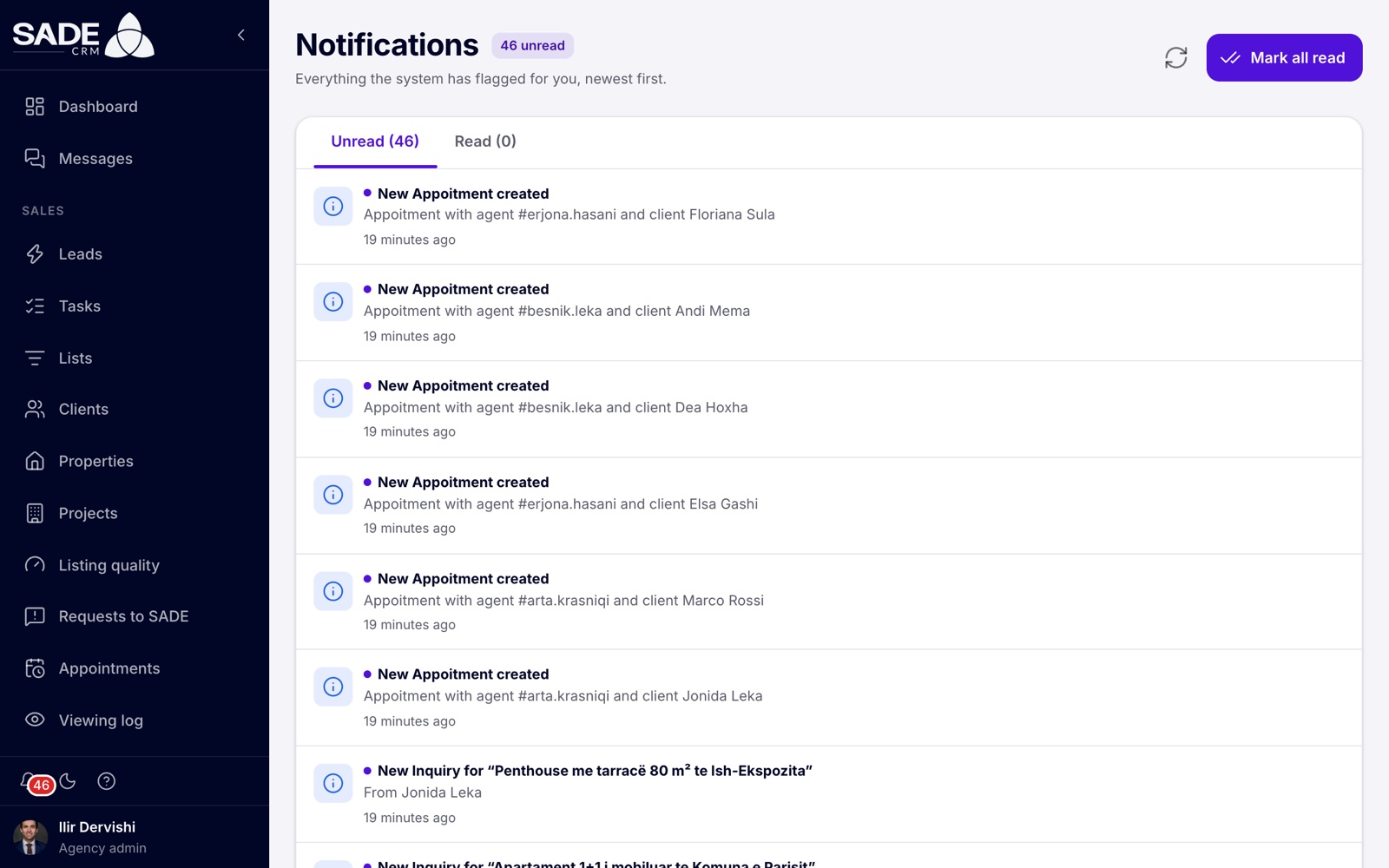
The Notifications page. Each row links to the client, listing or page it is about.
The bell
The bell sits at the bottom of the menu. Its red badge shows how many notifications you haven’t read.
- Click the bell to open the latest notifications.
- Click one to open what it is about, for example the client’s page. Opening it marks it as read.
- Click Mark all read to clear the badge, or View all notifications to open the full page.
When there is nothing new, the bell says “You’re all caught up”.
The Notifications page
Open it from View all notifications in the bell. The page has two tabs, Unread and Read, each with its count.
- Click a notification to open what it is about.
- Mark as read on a row moves it to the Read tab.
- Delete notification removes it from your list.
- Mark all read at the top marks every unread notification as read.
- The refresh icon fetches the latest. Load more at the bottom shows older notifications.
What you are notified about
Some common notifications, and who gets them:
| When | Who gets it | Example |
|---|---|---|
| A new lead is given to an agent | The agent | “New lead: Elira Gjoni” |
| A lead is offered to several agents, first to claim | Each agent it is offered to | “Claim this lead: Elira Gjoni” |
| A lead goes to the pond | Agents taking new leads, and agency admins | “New lead in the pond: Elira Gjoni” |
| A lead is still waiting for a first contact | The lead’s agent | “Elira Gjoni has waited 15 min” |
| Nobody has contacted a lead in time | Agency admins | “No one has contacted Elira Gjoni” |
| Someone asks about a listing | Agency admins | “New Inquiry for” and the listing’s title |
| SADE approves a listing | The listing’s agent | “SADE approved “Apartament 2+1 në Bllok”” |
| SADE doesn’t approve a listing | The listing’s agent, or the agency admins if it has none | “SADE didn’t approve “Apartament 2+1 në Bllok”“, with SADE’s reason |
| A listing will come off the marketplace in 7 days unless confirmed | The listing’s agent, or the agency admins | “Confirm your listing” |
| A listing came off the marketplace because it wasn’t confirmed | The same | “Listing taken off the marketplace” |
| A partner agency accepts an invitation or reserves a unit in your project | The project’s agency | “Adriatik Homes reserved Rezidenca Liqeni · T-901” |
| SADE decides on your verification | Agency admins | The decision, with a link to Verification |
| SADE starts a read-only view of your CRM | Agency admins | “SADE is viewing your CRM” |
| A plan payment didn’t go through | Agency admins | A link to Plan & billing |
The pages on lead routing, listing quality and partners explain when each of their notifications is sent.
Note: notifications are in Albanian when your agency’s CRM language is Albanian, and in English for every other language, whatever language you use the CRM in.
Emails
Besides the bell, SADE sends emails for these events:
| Who gets it | |
|---|---|
| Confirm your email | The person who signed the agency up. |
| Reset your password, and “Your password was reset” | The person resetting their password. |
| Password changed | A person whose password was changed, by themselves or by their agency admin. |
| Account removed | An agent the agency admin removed. |
| Verification decided (verified, not accepted or suspended) | The agency admins. |
| A plan payment didn’t go through | The agency admins and the billing email. At most once every 12 hours. |
| Listing about to expire, or expired | The listing’s agent, or the agency admins. |
| Listing not approved by SADE, with the reason | The listing’s agent, or the agency admins if it has none. |
| A viewing is booked | The viewing’s agent, and the client if they have an email address and the viewing is Pending, Confirmed or Rescheduled. |
| Reminder before a viewing | The viewing’s agent. |
| Invitation to set your password | A person an Enterprise organization invites. |
SADE’s emails are in Albanian when your agency’s CRM language is Albanian, and in English otherwise. That includes the password emails. Viewing emails are the exception: they are written in all 11 CRM languages, in your agency’s CRM language, and the client gets theirs in their own language when the CRM knows it. See What happens when you book.
Choosing what you receive
There are no notification settings: everyone gets the notifications that apply to their role, and you can’t turn a kind off. Use Mark all read to clear the ones you have dealt with.
The CRM in the browser shows notifications only inside the CRM. It doesn’t send desktop or browser notifications, so keep a CRM tab open during working hours if you take leads.
On the phone app
The SADE CRM app has the same notifications. A bell with the unread count sits at the top of each screen, and tapping a notification opens the client or listing it is about. See The mobile app.
At 10:02 a buyer asks about a 2+1 flat on Rruga e Durrësit. The routing rules give the lead to Arta, and her bell shows “New lead: Elira Gjoni”. She is with another client and doesn’t answer.
At 10:07 Arta’s bell shows “Elira Gjoni has waited 5 min”. Arta calls at 10:09 and logs the call, so the reminders planned for 15 and 60 minutes never come. Ilir, the agency admin, gets no “No one has contacted” notification either: the agency tells admins only after 30 minutes without a contact.
At the end of the day Arta opens the Notifications page and clicks Mark all read.
Something unclear or missing? Write to [email protected] or call +355 69 808 0118.