You create your agency’s account yourself, in a few minutes, at crm.sadegre.com/signup. Signing up creates three things at once: the agency, your own account as its Agency admin, and a 14-day free trial of a paid plan. No card or payment is asked for.
Your CRM works as soon as you confirm your email. Your listings go on the SADE marketplace later, once SADE has checked your registration documents (see Verification).
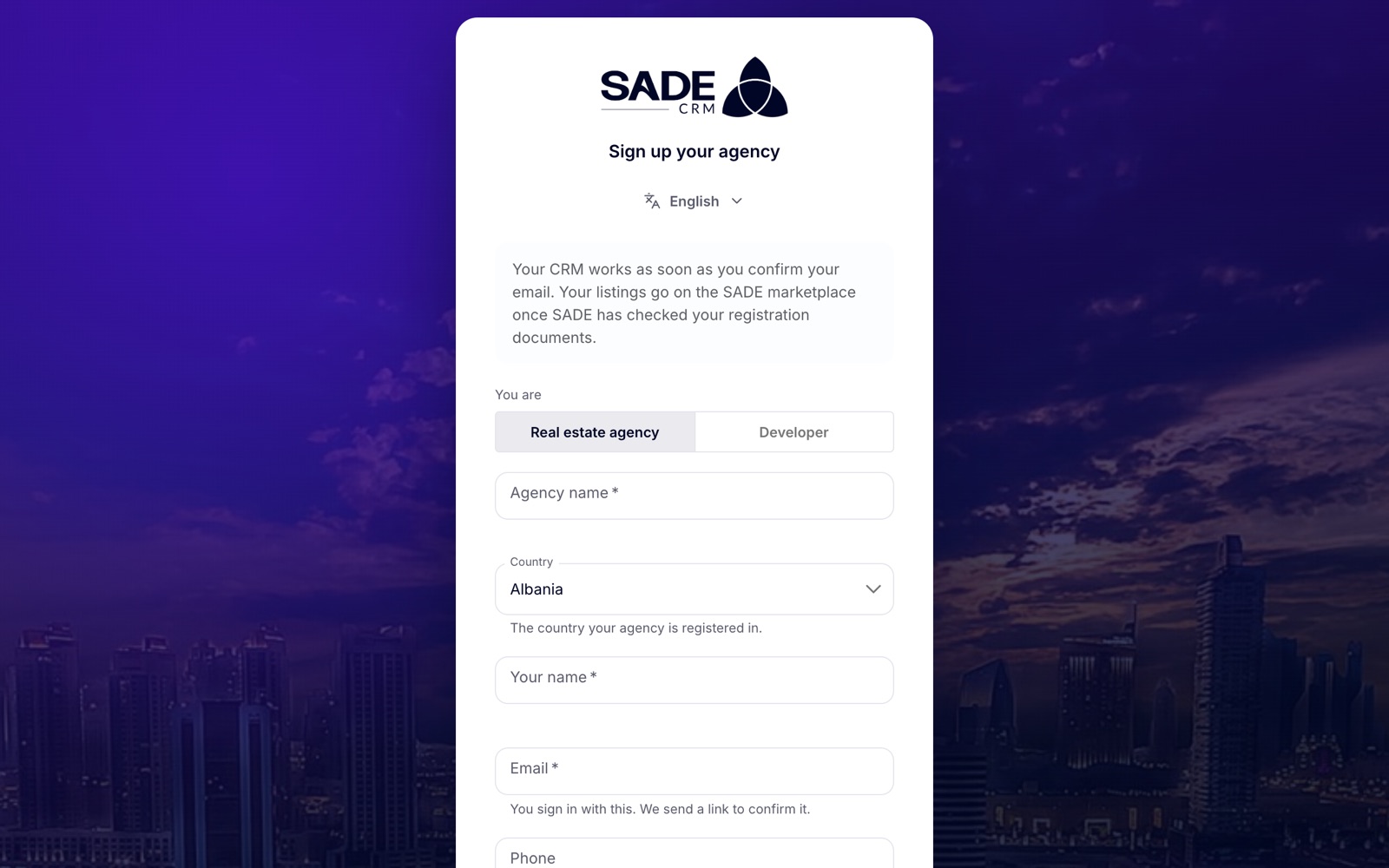
The sign-up form. The language switch at the top changes the language of the page.
Create your account
- Go to crm.sadegre.com and click Sign up your agency under the sign-in card. You can also start from a plan’s button on the pricing page.
- Under You are, choose Real estate agency or Developer. Choose Developer if you build and sell new developments.
- Fill in the form (see the table below).
- Tick I accept SADE’s terms of service and privacy policy. Both phrases are links, so you can read them first.
- Click Create account.
The page changes to “Check your email” and tells you where the link was sent.
| Field | What to enter |
|---|---|
| Agency name | Your agency’s name, as customers know it. It is called Company name when you choose Developer. 2 to 200 characters. |
| Country | The country your agency is registered in. It sets your time zone, your currency and the documents SADE asks for. You can’t change it later. |
| Your name | Your own full name. |
| The address you will sign in with. SADE sends a link to it to confirm it. | |
| Phone | Optional. Shown to SADE, not to the public. Write it in your country’s usual format. |
| Password | At least 8 characters, with an uppercase letter, a lowercase letter, a number and a symbol. A checklist under the field ticks each rule as you type. |
| Language | The language of your team’s CRM. It starts as the page’s language. You can change it later. |
Note: one email address can have only one account. If you see “There is already an account with this email.”, sign in instead, or use Forgot password?.
Confirm your email
You can’t sign in until you have confirmed your email address.
- Open the email “Confirm your email for SADE CRM” and click Confirm email.
- The CRM opens and confirms the address by itself. When you see “Email confirmed”, click Sign in.
- Sign in with the email and password you chose. See Signing in.
The link works for 24 hours. If it has expired, the page says “This link doesn’t work” and lets you ask for a new one.
If the email doesn’t arrive
- Check your spam folder first.
- Click Send the link again. It is on the “Check your email” screen, on the page a broken link opens, and on the sign-in page if you try to sign in before confirming.
- After each send, the button waits 60 seconds before you can use it again. SADE sends at most 3 links an hour to one account.
SADE’s emails about your account, such as the sign-up, verification, billing, password and listing emails, are in Albanian when your CRM language is Albanian, and in English for every other language. Viewing emails are written in all 11 CRM languages.
What you get
| Your role | Agency admin: you can change everything in the agency, including the team, settings and billing. See Team and roles. |
| Your plan | A 14-day free trial of the plan you picked on the pricing page. If you came straight to the sign-up page, the trial is of the Growth plan. If you came from an invitation to sell another agency’s project, the trial is of Pro, so you can accept it. See Plans and billing. |
| Time zone and currency | Set from your country, for example Europe/Tirane and EUR for Albania. You can change both in Agency settings. |
| Marketplace | Nothing of yours is public until SADE has verified the agency. See Verification. |
Developers
A company that signs up as a Developer gets the same CRM, with Projects moved to the top of the menu. The form shows “Developers start on a free trial of Pro, the plan with projects.” Developers always get a plan with projects, whichever plan the link named. See Projects overview.
Messages you may see
| Message | What to do |
|---|---|
| “This email already has an account.” | Sign in, or reset your password with Forgot password?. |
| “That phone number doesn’t look right.” | Check the number against your country’s format, or leave the field empty. |
| “The password doesn’t meet the rules below.” | Add whatever the checklist under the password still shows as missing. |
| “Accept the terms to continue.” | Tick the terms box. |
| “SADE doesn’t work in that country yet.” | Your country isn’t one of SADE’s 24 markets yet. |
| “Too many sign-ups from this network. Try again in a few minutes.” | Wait a few minutes and try again. |
Tip: you sign up on the web only. The phone app has no sign-up screen: create the account in a browser first, then sign in on the app with the same details.
Ilir Dervishi runs Tirana Living Real Estate, an agency in the Blloku area of Tirana. On Monday at 09:00 he opens the pricing page, clicks the Growth plan’s button and lands on the sign-up form.
He leaves Real estate agency selected, types “Tirana Living Real Estate”, keeps Albania as the country and enters his work email and mobile number (069 123 4567). He picks Shqip as the language, ticks the terms and clicks Create account.
The confirmation email arrives a minute later, in Albanian because he chose Shqip. He clicks the button, sees “Email confirmed” and signs in. His agency is on a Growth trial for 14 days, its clock is set to Europe/Tirane and its currency to EUR. The next thing he does is send his NUIS and documents for verification.
Something unclear or missing? Write to [email protected] or call +355 69 808 0118.