The SADE marketplace only shows listings that someone at the agency has recently confirmed are still for sale or rent. A listing that nobody confirms comes off the marketplace by itself. Each published listing also has a quality score out of 100, and higher scores rank higher in marketplace search.
The Listing quality page, under Sales in the menu, brings this together for agency admins and agents: the score of each published listing, what would raise it, any flags, and when each listing comes off the marketplace. The same information is in the Listing quality card on every published listing’s page.
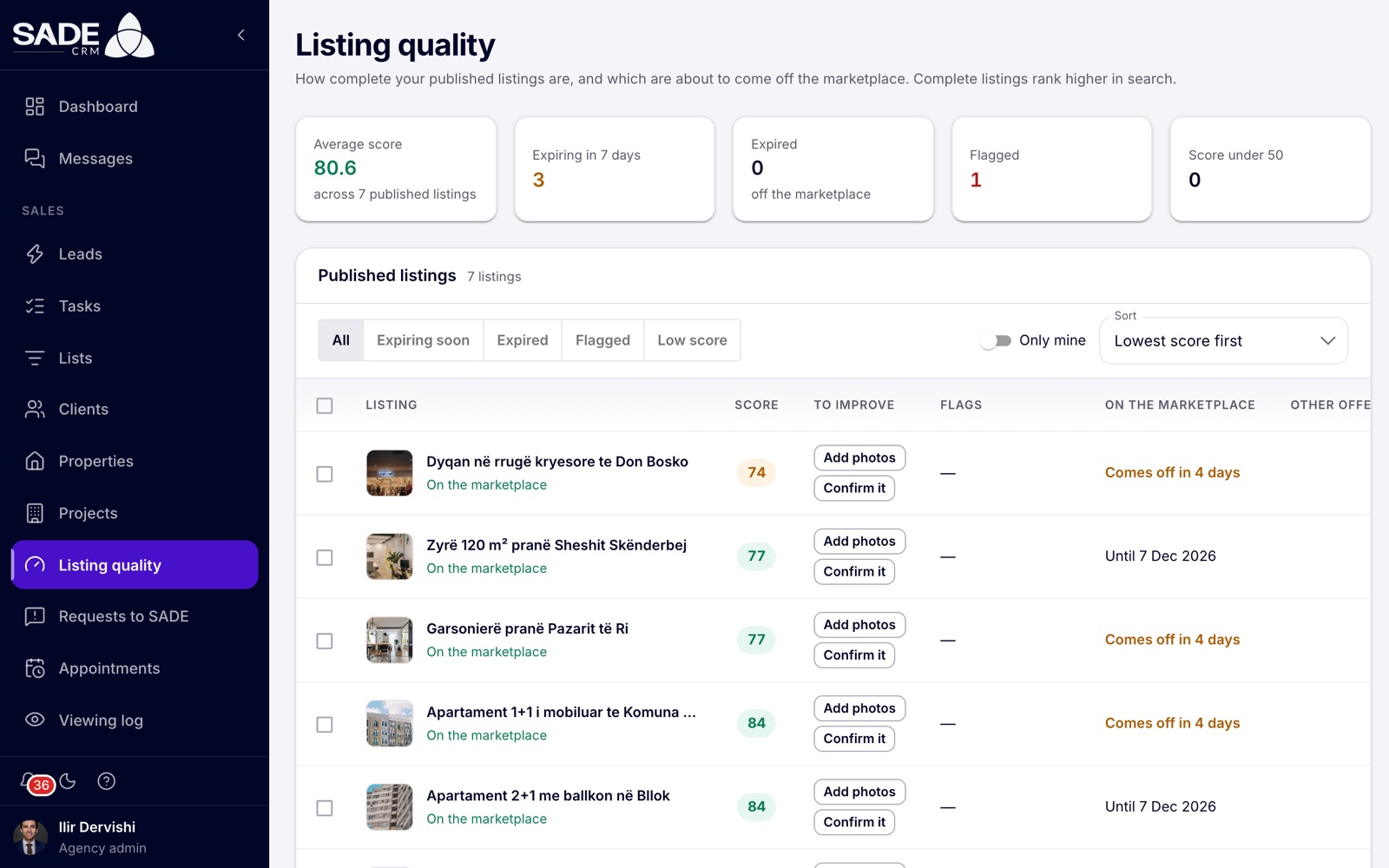
Three listings come off in 4 days and one is flagged.
How long a listing stays on the marketplace
A published listing stays on the marketplace for a set period after it was last confirmed:
| Listing type | Period |
|---|---|
| For sale | 60 days |
| For rent | 30 days |
These things confirm a listing and start the period again:
- creating it, and SADE approving it;
- saving a change to what the listing says (price, text, details, photos, amenities), from the web, the phone app or an import;
- clicking Still available.
Reminders
Seven days before a listing would come off, the assigned agent gets a reminder by notification and by email: “Confirm your listing”. If nobody is assigned, the agency admins get it. Several listings for the same person come in one email.
When a listing expires
If nobody confirms it in time, the listing comes off the marketplace on its date. Its marketplace page then says it is no longer available, and it stops appearing in search. The same people get a notification and an email: “Listing taken off the marketplace”.
An expired listing keeps the status Published in the CRM. Only the Listing quality page and the listing’s quality card show that it has expired. Confirming it brings it back on the marketplace at once.
Confirming a listing
Only confirm a home that is still for sale or rent. When a home is sold or rented through your agency, close the deal instead, so the listing becomes Sold or Rented and leaves the marketplace.
One listing, from its page:
- Open the listing from Properties. If you came from a reminder, the page scrolls to the Listing quality card and outlines it.
- In the card, click Still available. The CRM says “Confirmed: it stays on the marketplace”.
One listing, from Listing quality: click Still available at the end of its row.
Several at once:
- On Listing quality, tick the rows, or tick Select this page at the top of the table.
- Click Still available (3) (the number is how many you ticked).
- The dialog asks “Confirm 3 listings?” and reminds you to confirm only homes still for sale or rent. Click Still available.
The CRM says how many were confirmed, for example “3 listings confirmed.”, and how many were not because they are no longer published. You can confirm up to 500 listings at a time. Clear empties the selection.
Tip: editing a listing confirms it too, so a listing you have just updated does not need Still available.
The Listing quality page
The page lists your agency’s published listings, whether they are on the marketplace now or have expired. Listings waiting for review, rejected, sold or rented are not here.
Tiles
Click a tile to filter the table:
| Tile | What it counts |
|---|---|
| Average score | The average score across your published listings. |
| Expiring in 7 days | Listings that come off the marketplace within a week. |
| Expired | Listings already off the marketplace. |
| Flagged | Listings with an open flag. |
| Score under 50 | Listings with a low score. |
Filters and sorting
- Filter buttons: All, Expiring soon, Expired, Flagged, Low score. Expiring soon and Expired sort the list by Expiring first.
- Only mine shows only the listings assigned to you.
- Sort: Lowest score first (the default), Highest score first or Expiring first.
- Rows sets how many listings show on a page.
Columns
| Column | What it shows |
|---|---|
| Listing | The photo, the title, and whether it is on the marketplace now. |
| Score | The score out of 100. |
| To improve | Up to three tips that would raise the score, or “Nothing to add”. |
| Flags | Open flags, if any. |
| On the marketplace | “Until 7 Dec 2026”, “Comes off in 4 days”, “Comes off today” or “Expired” with the date. |
| Other offers | If other agencies list the same home: how many, and whether search shows yours. |
The quality score
The score runs from 0 to 100 and is made of these parts:
| Part | Points | Full marks when |
|---|---|---|
| Photos | 25 | The listing has 8 photos or more. Fewer photos get a share of the points. Videos don’t count. |
| Description | 15 | The description has 400 characters or more. |
| Details | 15 | Area, type, year built, and for homes the bedrooms and bathrooms, are filled in. Land needs no year built. |
| On the map | 10 | The pin is placed. A neighbourhood without a pin counts half. |
| Price | 10 | The listing has a price and no open price flag. |
| Recently confirmed | 15 | Confirmed in the last 14 days. Within its period but not in the last 14 days: 8. Expired: 0. |
| Verified agency | 10 | Your agency is verified by SADE. |
| Open flags | minus 15 each | Each open flag takes 15 points off. |
The score never goes below 0. It is updated every 15 minutes for listings that changed.
On the marketplace, the default order mixes the score with how recently the listing was first published. Confirming a listing does not make it new again, but a complete, recently confirmed listing ranks higher than an incomplete one.
Raising the score
Each tip in To improve, and in the card on the listing’s page, points to one part:
| Tip | What to do |
|---|---|
| Add photos | Edit the listing and add photos, up to 8 or more. |
| Longer description | Write at least 400 characters. |
| Add details | Fill in area, type, year built, bedrooms and bathrooms. |
| Place on the map | Edit the listing and put the pin on the building. |
| Add a price / Check the price | Add the price, or check it against similar listings. |
| Confirm it | Click Still available, or edit the listing. |
| Verify your agency | An agency admin sends SADE the documents under Settings → Verification. See Verification. |
| Resolve flags | See Flags below. |
Saving an edit also confirms the listing, so adding photos raises both Photos and Recently confirmed.
Flags
A flag is a possible problem raised by SADE’s automatic checks or by visitors to the marketplace. It shows in the Flags column and on the listing’s quality card. Only SADE’s moderators close flags, except where the table says otherwise.
| Flag | What it means | What to do |
|---|---|---|
| Unusual price | The price per m² is far below or far above the median of similar listings in the area (same city, type, and sale or rent). | If the price is right, leave it: SADE’s moderators will check. If it is a typo, fix it. The flag closes by itself once the price is back in range. |
| Photos used elsewhere | Some photos also appear on an older listing of a different home. | Use your own photos of this home. |
| Possible duplicate | The listing looks like another of yours, or another listing of the same home. | If it is the same home, remove one of your listings. Otherwise SADE’s moderators will decide. |
| Reported by visitors | Visitors reported it, with reasons such as “no longer available” or “wrong price”. | Check the listing is right and still available. SADE’s moderators will look at it. |
| No property code | The listing has no cadastral number. | Add the code when you edit the listing, once the home has one. No points off. |
Every open flag except No property code takes 15 points off the score.
The same home listed by several agencies
When two or more agencies list the same home, the marketplace shows it once in search: the listing with the highest quality score. SADE compares public listings every 30 minutes, by place, type, size, price, pin and photos.
The Other offers column, and Also listed by on the listing’s card, tell you whether search shows your listing or another offer with a higher score. To be the one shown, raise your score.
Note: on the phone app, Listings to confirm under More lists your expiring and expired listings and confirms them one by one or several at once. See The mobile app.
On Monday morning Ilir Dervishi opens Listing quality at Tirana Living Real Estate. The tiles show 7 published listings with an average score of 80.6, Expiring in 7 days 3, and Flagged 1.
He clicks the Expiring in 7 days tile. The three listings come off in 4 days. He checks with Arta and Erjona that all three are still on the market, ticks them, clicks Still available (3) and confirms. The CRM says “3 listings confirmed.” Each one for sale stays on the marketplace for another 60 days from today, and each one for rent, like the furnished 1+1 at Komuna e Parisit, for another 30.
Next he clicks Flagged. Arta’s penthouse at Ish-Ekspozita shows Unusual price: when she lowered the price last week, she typed €39,500 instead of €395,000. Arta edits the price and saves. The flag closes by itself once SADE’s check sees the price is back in range.
Last, Erjona’s “Apartament 3+1 me pamje nga Liqeni” scores 84: it has 5 photos, so Photos gives 16 of 25, and it was last confirmed more than 14 days ago, so Recently confirmed gives 8 of 15. Erjona adds three more photos and saves. With 8 photos and a fresh confirmation, the listing reaches 100 at the next update.
Something unclear or missing? Write to [email protected] or call +355 69 808 0118.