API keys and webhooks connect SADE CRM to the rest of your software. They need a developer, or a tool such as an automation service that can send and receive web requests.
- An API key lets a server send leads and activity into your CRM: your website’s back end, an advertising tool’s lead forms, your own systems.
- A webhook is the other direction: SADE CRM calls a web address of yours each time something happens to one of your clients, so your other software can follow along.
Both are set up by an agency admin under Settings → Integrations, on the web CRM only. The API keys card links to this page: How to set up API keys and webhooks. For a simple contact form on your website you need neither: use a website form. To let other portals read your listings, see the Kyero and OpenImmo feeds in Imports and feeds.
Give your developer this page. It has everything they need.
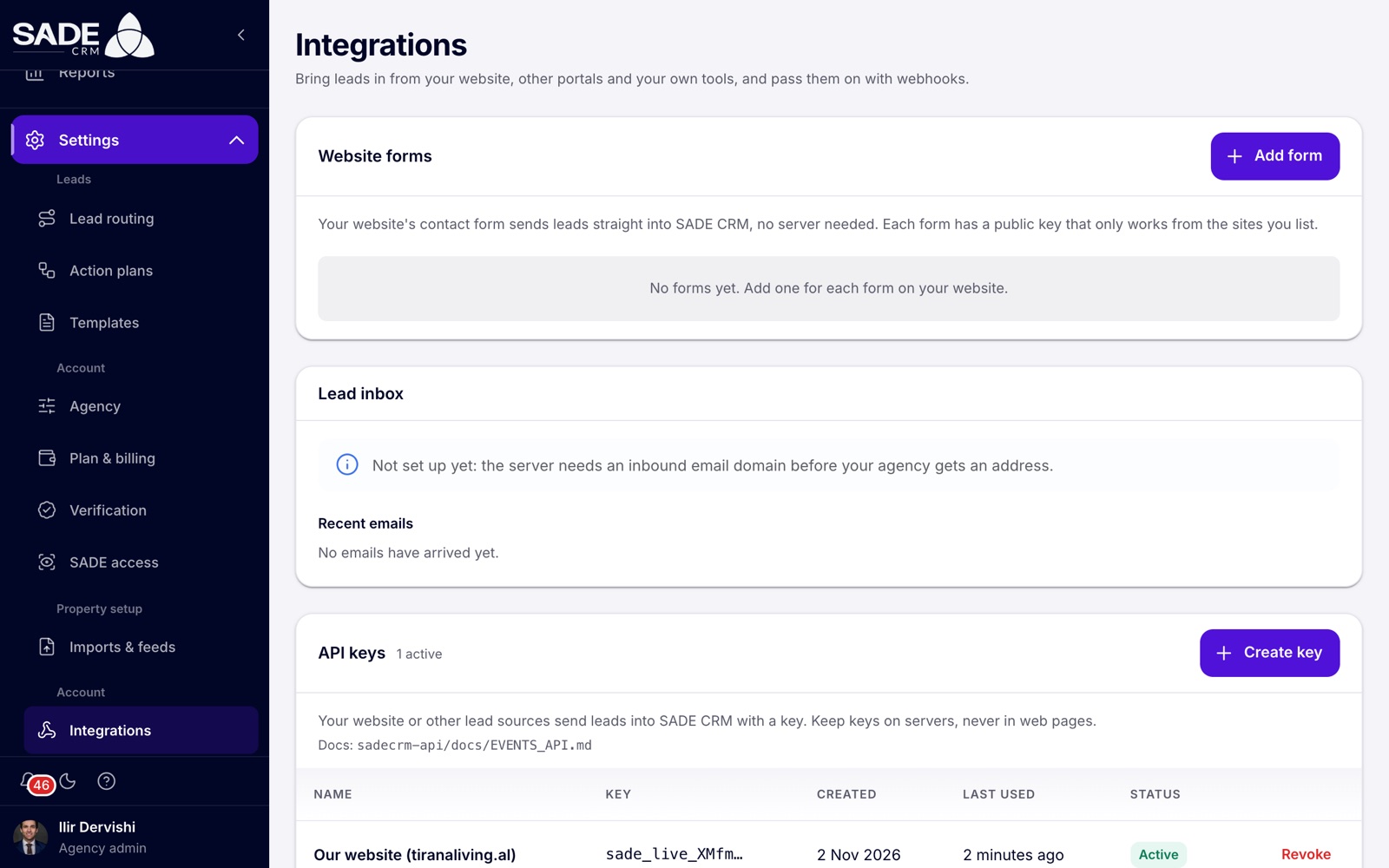
Settings → Integrations. The API keys card is lower down, and Webhooks below it.
API keys
Creating a key
- Open Settings → Integrations and go to the API keys card.
- Click Create key.
- Give it a Name after what will use it, such as “Our website” or “Facebook lead ads”. The name tells you which key to revoke later, and it is the source of the leads sent with the key unless the sender gives another one.
- Click Create key.
- The Copy your new key dialog shows the key once. Click Copy key.
- Click I’ve copied it.
- Give the key to your developer through a safe channel, such as a password manager. Not by plain email or chat.
Important: you won’t see the key again. SADE CRM keeps only a fingerprint of it, so nobody, SADE included, can show it to you later. If it is lost, revoke it and create a new one.
Keeping keys secret
A key starts with sade_live_. Anyone who has it can send leads into your CRM.
- Keep keys on servers only. Never put a key in a web page, a phone app or anything a visitor’s browser downloads, where anyone can read it.
- Create one key for each website or tool. Then you can turn one off without touching the others.
- If a key may have got out, revoke it and create a new one.
The keys list
The list shows each key’s Name, the start of the Key (for example sade_live_XMfm…), when it was Created, when it was Last used (“Never” if not yet), and its Status: Active or Revoked. Every key can do the same thing: send events into your agency. There are no separate permissions to choose.
Revoking a key
- Click Revoke on the key’s row.
- Confirm with Revoke key.
From that moment anything still sending with the key is turned away. Revoking can’t be undone; the key stays in the list, greyed, as Revoked.
Sending leads with a key
Your developer sends each lead or piece of activity as a POST request to the path /api/v1/events on SADE’s API address. That address is the one in your website form code: the part before /forms/v1.js under Code for your website. If you have no website form, ask SADE for it.
Send the key in the Authorization header. Everything is JSON, and times are in ISO 8601 with a time zone.
POST /api/v1/events
Authorization: Bearer sade_live_…
Content-Type: application/json
Idempotency-Key: 7d4c0a3e-2b1f-4c55-9e0a-3f1d2a6b8c90
{
"type": "property_inquiry",
"source": "tiranaliving.al",
"message": "Is the flat still available? Could I see it on Saturday?",
"person": {
"name": "Klea Muka",
"email": "[email protected]",
"phone": "+355 68 412 3377",
"language": "sq"
},
"property": { "id": "c8f933f3-95d8-4d30-8ef5-f925e29aed3d" },
"consents": [
{
"channel": "phone",
"purpose": "contact",
"granted": true,
"wording": "I agree to be contacted about my enquiry.",
"language": "en"
}
]
}Only type, and an email or phone for the person, are required.
| Field | What to send |
|---|---|
type |
What happened. See the event types below. |
source |
Where the person was, in your words. Shown in the CRM as the lead’s source. If left out, the key’s name is used. |
occurredAt |
When it happened. If left out, now. |
message |
What the person wrote. Up to 4,000 characters. |
person |
name (or firstName and lastName), email, phone and language. A phone without a country code is read as a number in your agency’s country. |
property |
The listing it is about. For one of your SADE listings, send { "id": "…" }: the id is the last part of the listing’s page address in the CRM. For a listing elsewhere, describe it instead, with fields such as url, city and price; the description is kept with the event. |
project |
A project it is about, as { "id": "…", "unitCode": "A-304" }. unitCode is optional. |
page, campaign |
Where the person was (url, title, referrer) and how they got there. |
consents |
What the person agreed to. Each one has a channel (email, sms, whatsapp or phone), a purpose (contact or marketing), granted (true or false), and, when granted, the exact wording they saw. |
id |
Your own id for the event. The same as the Idempotency-Key header. |
A key can name only your own listings and projects. Naming another agency’s is refused.
Event types
Intent events are someone asking to be contacted. They create the person if you don’t have them yet, as a new lead, and route, time and alert it like any lead:
registration, inquiry, property_inquiry, seller_inquiry, general_inquiry, incoming_call, visited_open_house.
Behaviour events only add to the timeline of someone you already have. About a person you don’t know, they are answered ignored and nothing is stored:
viewed_property, saved_property, property_search, saved_property_search, visited_website, viewed_page, unsubscribed.
What comes back
{
  "status": "created",
  "eventId": "f1397256-2319-4810-a32b-4966c61777a9",
  "personId": "ccb5e979-4b32-4283-997f-74cd01cc3675",
  "inquiryId": "1b4a29af-d287-48d0-9399-32e75c3528de"
}| Answer | status |
Meaning |
|---|---|---|
| 201 | created |
A new person was created. |
| 200 | updated |
The event was added to a person you already had. |
| 200 | duplicate |
This id was already sent with this key. Nothing new is recorded, and the first answer’s ids come back. |
| 200 | ignored |
A behaviour event about someone you don’t know. |
| 401 | The key is missing, unknown or revoked. | |
| 422 | Something in the event is wrong. message says what. |
|
| 429 | Too many requests. Wait the number of seconds in the Retry-After header. |
inquiryId is null when the event opened no enquiry on a listing.
Rules for senders
- Send each event once, safely. Give every event an id, in the
Idempotency-Keyheader or asid, and send the same id when you retry. The CRM records it once. - Rate limit. Each key may send 60 events a minute.
- One person, many events. People are matched within your agency by email, then by phone, whatever way the number is written. An event never overwrites what you already have; it only fills in what is missing.
- Leads sent with a key are routed, timed and alerted like leads from the marketplace, and fire your webhooks.
Webhooks
Adding a webhook
- Open Settings → Integrations and go to the Webhooks card.
- Click Add webhook.
- Enter the URL where SADE CRM should send the requests. It must start with
https://. - Under Send when, tick Anything happens, including events added later, or tick the events you want.
- Click Add webhook.
- On the webhook’s row, click Show secret, then Copy secret. Give the URL and the secret to your developer.
- Click Send test and read the result.
The URL must be a public https:// address on the internet, up to 2,048 characters. Addresses without https://, private network addresses and addresses with a user name or password in them are refused.
Events
| Tick box | Event | Sent when |
|---|---|---|
| A client is added | person.created |
A client is created, by a lead or by hand in the CRM. |
| A client’s details change | person.updated |
Their name, email, phone, address or city changes. |
| A client’s stage changes | person.stage_changed |
Their lead stage changes. change holds from and to. |
| A client is assigned to an agent | person.assigned |
They are given to another agent, including when an agent claims a lead. change holds the from and to user ids. |
| A duplicate is merged into a client | person.merged |
An admin merges a duplicate into them. mergedId is the record that no longer exists. |
| Activity is recorded for a client (website, marketplace) | event.created |
Any lead or activity is recorded for them, from the marketplace, a website form or an API key. |
| A note is written | note.created |
An agent writes a note about them. |
The row shows the events a webhook listens for, or All events.
What a delivery looks like
Each delivery is a POST with a JSON body like this one, for a stage change:
{
  "id": "5a0e6c1e-8a4f-4f5b-9d43-1c2b7e9f0a11",
  "event": "person.stage_changed",
  "companyId": "3f7a1c28-6d0b-4f8e-a1c2-9b7d5e4f3a20",
  "createdAt": "2026-11-05T14:54:12Z",
  "data": {
    "person": {
      "id": "ccb5e979-4b32-4283-997f-74cd01cc3675",
      "companyId": "3f7a1c28-6d0b-4f8e-a1c2-9b7d5e4f3a20",
      "name": "Klea Muka",
      "email": "[email protected]",
      "phone": "+355684123377",
      "stage": "spoke_with_customer",
      "assignedAgentId": "8d2e4b61-0c3a-4f7e-b5d9-2a1c6e8f4b03",
      "source": "tiranaliving.al",
      "createdAt": "2026-11-05T14:41:07Z",
      "lastActivityAt": "2026-11-05T14:53:58Z"
    },
    "change": { "from": "lead", "to": "spoke_with_customer" }
  }
}data.personis in everyperson.*event. Fields with no value are left out.event.createdsendsdata.event(the type, source, message, listing and so on) anddata.person.note.createdsends the note indata: itsid,personId,text,authorUserIdandcreatedAt.- Stages are sent by their keys:
lead,attempted_contact,spoke_with_customer,appointment_set,met_with_customer,showing_homes,listing_agreement,active_listing,submitting_offers,under_contract,closed,nurtureandtrash. - Times are in UTC.
The request carries these headers:
X-Sade-Event: person.stage_changed
X-Sade-Delivery: 5a0e6c1e-8a4f-4f5b-9d43-1c2b7e9f0a11
X-Sade-Signature: t=1793890452,v1=9f3c…
User-Agent: SadeCRM-Webhooks/1.0
X-Sade-Delivery is the same as id. Deliveries can arrive more than once and out of order: use X-Sade-Delivery to drop repeats, and createdAt to put them in order.
Checking the signature
Every delivery is signed with the webhook’s secret, which starts with whsec_. Check the signature before trusting a delivery:
- Read
t(a time in Unix seconds) andv1from theX-Sade-Signatureheader. - Compute HMAC-SHA256 of the text
{t}.{raw body}(the time, a full stop, then the body exactly as received), with the secret as the key, written as lower-case hexadecimal. - Compare it with
v1, in constant time. - Reject the delivery if
tis more than five minutes old.
In Node.js:
import crypto from "node:crypto";

function isFromSade(rawBody, header, secret) {
  const { t, v1 } = Object.fromEntries(header.split(",").map((p) => p.split("=")));
  const expected = crypto.createHmac("sha256", secret).update(`${t}.${rawBody}`).digest("hex");
  const fresh = Math.abs(Date.now() / 1000 - Number(t)) < 300;
  return fresh && v1?.length === expected.length &&
    crypto.timingSafeEqual(Buffer.from(expected), Buffer.from(v1));
}
The secret can be shown again at any time with Show secret. There is no button to change it: to get a new secret, delete the webhook and add it again, which also removes its delivery history.
Answering, retries and switching off
- Answer with any
2xxstatus within 10 seconds. Anything else counts as a failure, and so does a redirect: redirects are not followed. - A failed delivery is tried again with growing gaps, up to 9 attempts over about an hour and a half.
- After 50 failed attempts in a row (each retry counts as one), the webhook switches itself Off and the card says why: “Switched off after 50 failed deliveries in a row. Last error: …”. Fix the receiver, then switch the webhook back on. Switching it on starts the count again.
- While a webhook is off, nothing is sent to it.
Testing and the delivery log
Send test sends a ping event at once, with data.message “A test from SADE CRM.”, even while the webhook is off. The card shows “Test delivered. Your server answered 200.” or why it failed. Test pings are not listed in the log and don’t count as failures.
Recent deliveries opens the last 50 deliveries, newest first, with the Event, Status (Delivered, Failed or Pending), the number of Attempts, the Response your server gave, and when it was Created. Click Refresh to update it.
Changing, pausing and deleting
- The On / Off switch pauses a webhook without losing anything.
- The pencil opens Edit webhook to change the URL or the events.
- The bin deletes the webhook. Nothing more is sent to it, and its delivery history is removed.
Example
Tirana Living Real Estate has its own website, tiranaliving.al, with a viewing request form on each listing page, built by its web designer. Ilir Dervishi creates an API key named “Our website (tiranaliving.al)” and gives it to the designer through the agency’s password manager. The website’s server now sends each request as a property_inquiry with the listing’s id and the visitor’s consent. When Klea Muka asks about “Apartament 2+1 në Bllok” at 15:41, she arrives as a new lead with the source tiranaliving.al, the same source as the agency’s website form. The routing rule for that source offers her to Arta Krasniqi and Besnik Leka, and Arta claims her.
The agency also keeps its accounts in a separate system and wants to know when a client reaches Closed. Ilir clicks Add webhook, enters https://hooks.tiranaliving.al/sade, ticks A client’s stage changes, and clicks Add webhook. He copies the secret for the designer and clicks Send test: “Test delivered. Your server answered 200.”
When Arta moves Klea to Spoke with Customer at 15:54, the accounts system receives person.stage_changed with "from": "lead" and "to": "spoke_with_customer", checks the signature, and ignores it, because it acts only on "to": "closed".
Something unclear or missing? Write to [email protected] or call +355 69 808 0118.