Every listing you add in the CRM, on the web or the phone app, is checked by SADE’s moderators before it goes public. Until then it is Pending. Once a moderator approves it, it becomes Published and appears on the SADE marketplace at sadegre.com, provided your agency is verified. There is no separate “publish to marketplace” switch: a public listing is on the marketplace automatically.
When a buyer contacts you about a published listing, the enquiry comes straight back into the CRM as a lead.
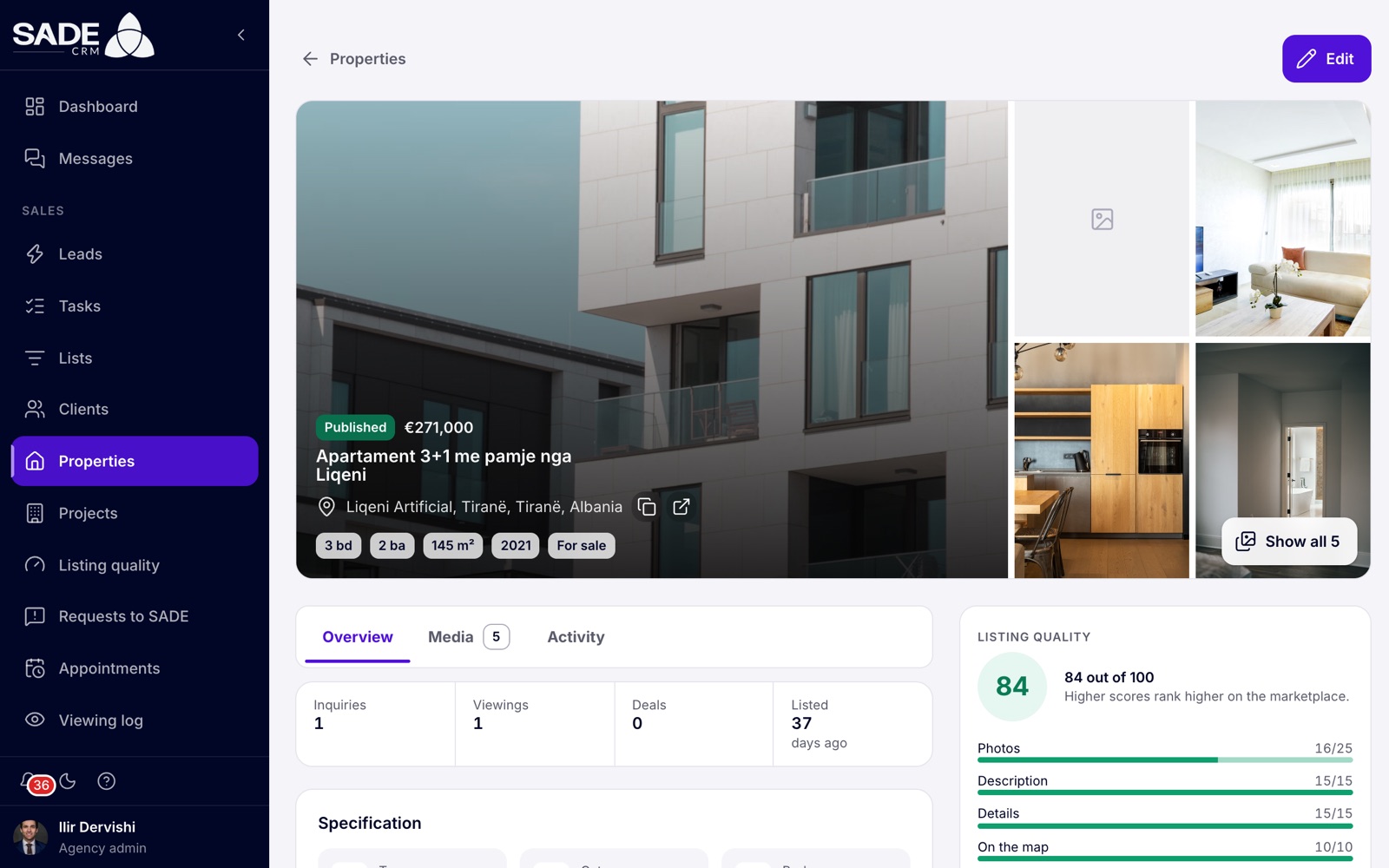
A published listing. The badge on the photo shows its status.
What SADE checks
A moderator opens each new listing and either approves it or rejects it with a reason. The reasons moderators can choose from show what they look at:
- the photos are missing or unclear;
- the price looks wrong;
- the address or location is incomplete;
- the description needs more detail;
- the property is already listed.
A moderator can also write a reason of their own.
Tip: before you click Create property, check that the photos are your own and sharp, the price is typed correctly, the pin is on the building and the description says enough for a buyer to want a viewing. The quality score rewards the same things.
Listing statuses
| Status | What it means | On the marketplace? |
|---|---|---|
| Pending | Created and waiting for SADE’s review. Every listing added in the CRM starts here. | No |
| Published | Approved by SADE. | Yes, if your agency is verified and the listing is not blocked or expired. |
| Rejected | Turned down by SADE, with a reason. Fix it and save it to send it back. | No |
| Blocked | Hidden by SADE’s moderators. See Blocked by SADE. | No |
| Sold | A deal on the listing (for sale) was completed. | No |
| Rented | A deal on the listing (for rent) was completed. | No |
| Withdrawn | Taken off by its spreadsheet or feed: marked as withdrawn there, or no longer in it. | No |
The statuses change through SADE’s review, through deals and through imports. You can’t choose a listing’s status yourself: on the edit page the Status field only shows it, with the hint “SADE publishes the listing once it’s approved. Sold and Rented come from closing a deal.”
When SADE approves a listing
- The status becomes Published.
- The listing’s assigned agent gets a bell notification, “SADE approved “title”“, with “The listing was approved and is now published.” Clicking it opens the listing.
- The listing’s marketplace period starts: 60 days for sale, 30 days for rent, before it needs confirming. See Listing quality and expiry.
- If your agency is verified, the listing appears on the marketplace within minutes.
When SADE rejects a listing
- The status becomes Rejected.
- The listing’s assigned agent gets a bell notification, “SADE didn’t approve “title”“, with the moderator’s reason. Clicking it opens the listing. If the listing has no agent, the agency admins get it.
- The same people get an email, “SADE didn’t approve your listing: title”, with the reason and an Open the listing button.
- The listing’s page shows the reason in a box headed “SADE didn’t approve this listing”, with a Fix the listing button.
Fixing a rejected listing
- Open the listing and click Fix the listing, or click the pencil in the Properties list.
- The edit page shows SADE’s reason at the top. Change what SADE asked for, for example add sharper photos or correct the price.
- Click Save changes.
The CRM says “Saved and sent back to SADE for review.” The listing is Pending again and goes back to SADE’s moderators, who see the earlier reason. You need to change at least one thing: if nothing has changed, the CRM says “No changes to save.”
If you would rather not list the home, delete the listing instead. See Deleting a listing.
Published is not the same as public
A listing is on the marketplace only when all of these are true:
- its status is Published;
- it is not blocked;
- it has not expired (someone confirmed it within its period);
- your agency is verified by SADE.
If a published listing is not on the marketplace, check these four in that order. The Listing quality card on the listing’s page tells you if it has expired.
Your agency must be verified
Everything in the CRM works from the day you sign up, but nothing goes on the marketplace until SADE has verified your agency. The agency admin sends the business number and documents under Settings → Verification; see Verification. Once your agency is verified, its published listings appear on the marketplace without any further step.
On the marketplace, verified agencies carry the Verified agency badge, with the explanation that SADE checked the agency against the business register before its homes could be listed. Being verified is also worth 10 points of each listing’s quality score.
Listings from imports and feeds
New listings that come from a spreadsheet import or a feed depend on your agency’s verification:
- Verified agency: they are created as Published straight away and appear on the marketplace without waiting in SADE’s review queue. SADE’s moderators look at them afterwards, and can block one.
- Not verified yet: they are created as Pending and wait for SADE’s review, like listings you add by hand.
See Imports and feeds.
What buyers see on the marketplace
A listing appears on the marketplace of your agency’s country, in the visitor’s language. Its page shows:
| Shown | Details |
|---|---|
| Photos and video | All the media you uploaded, with the first photo as the cover. |
| Price | As you entered it, with an approximate conversion into the country’s usual currencies. |
| Facts and features | Type, category, bedrooms, bathrooms, living area, year built, energy class, availability, amenities and your description. |
| Dates | When it was listed and when it was last updated. |
| Location | A shaded area of about 300 m, or the exact pin if you switched on Show the exact location on the website. |
| Your agency and agent | With the Verified agency badge. |
| Contact buttons | WhatsApp, Call, Request a viewing, or a message. |
The marketplace never shows the property code, the How to find it directions or the owner.
If several agencies list the same home, search shows it once (the listing with the highest quality score), and its page lists the other agencies under “Also offered by”.
Changes after publishing
When you edit a published listing, the change shows on the marketplace shortly after you save it. Saving also confirms the listing for another period.
How enquiries come back as leads
Every contact from the marketplace about your listing, from the website or its phone app, is recorded first as a lead in your CRM, tied to the listing:
- a message;
- a viewing request;
- a tap on Call or WhatsApp. The visitor sees the agent’s (or the agency’s) number only after the lead is recorded.
Your lead routing decides who gets the lead, and the agent is notified straight away. See Leads for how to work it.
The enquiry also shows on the listing’s page: it is counted under Inquiries at the top, and listed on the Activity tab.
Besnik Leka adds “Apartament 2+1 me garazh” in Kodra e Diellit on a Tuesday afternoon. It shows in Properties as Pending.
On Wednesday morning a SADE moderator approves it. Besnik gets a bell notification: “SADE approved “Apartament 2+1 me garazh”“. Tirana Living Real Estate is verified, so the flat is on sadegre.com a few minutes later, with the Verified agency badge and a shaded area around Kodra e Diellit instead of the exact building.
That evening, a buyer called Elton Muça clicks Request a viewing on the listing page and leaves his phone number. The request arrives in the CRM as a new lead tied to the listing. The agency’s routing rules give leads on Besnik’s listings to Besnik, so he gets a notification and the lead waits for him in Leads. The listing’s page now shows Inquiries 1, and the Activity tab lists Elton’s request.
The same day, SADE rejects Erjona Hasani’s “Vilë me pishinë në Linzë” with the reason “The photos are missing or unclear.” Erjona gets the notification and the email, clicks Fix the listing on the listing’s page, replaces three dark photos with sharp ones and clicks Save changes. The CRM says “Saved and sent back to SADE for review.”, and the villa is Pending again.
Something unclear or missing? Write to [email protected] or call +355 69 808 0118.